




One of the features i have seen added to comments on WordPress blogs recently is the Facebook like button. This is a quiet clever addition to the comments as the like button only takes a second to click and if a reader is leaving a comment they obviously do like or have an opinion on the post making them more likely to share your post with their facebook friends. So in this post i will show you how to add a Facebook like icon to the Comments on your Blogger Blog .Adding the Like Button to let readers Share On Facebook is easy and it actually fits perfectly above the comment form. So lets look at the Screenshot and Live demo.
Screenshot :
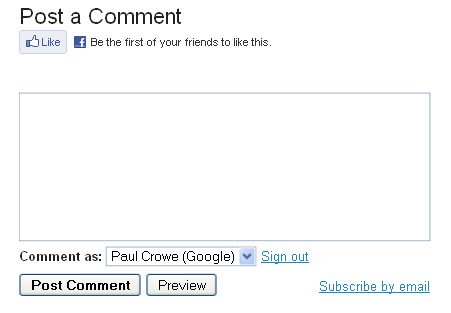
Live Demo – Click To See The Live Demo : Facebook Like In Comments
OK lets add this cool feature to your blog
Add Facebook Like Button To Blogger Comments
Step 1. In your Blogger Dashboard click > Design > Edit Html > Expand Widget Templates :
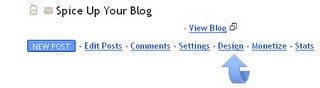
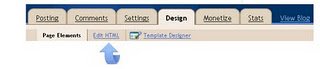
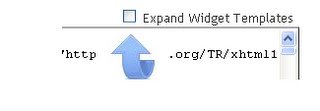
Step 2. Find the following piece of code in your blogs Html : (Click Ctrl and F for a search bar to help find the code – More Info)
<data:postCommentMsg/>
Important – This code will be in your template more than once, you need to find the code wrapped in heading tags (Example – h2, h3, h4).So it will look similar to this :
<h4 id='comment-post-message'><data:postCommentMsg/></h4>
Step 3. Copy And Paste The Code Below Directly After <data:postCommentMsg/>
<a href='http://www.spiceupyourblog.com'><img alt='Best Blogger Tips' src='http://3.bp.blogspot.com/_rKG-ziTSNUQ/TQ5eV0U0EiI/AAAAAAAACik/xo2eFaDbfrE/s1600/best+blogger+tips.png'/></a><br/><iframe allowTransparency='true' expr:src='"http://www.facebook.com/plugins/like.php?href=" + data:post.url + "&layout=standard&show_faces=false&width=100&action=like&font=arial&colorscheme=light"' frameborder='0' scrolling='no' style='border:none; overflow:hidden; width:450px; height:40px;'/>
It will now look like this :

<h4 id='comment-post-message'><data:postCommentMsg/></h4><br/><a href='http://www.spiceupyourblog.com'><img alt='Best Blogger Tips' src='http://3.bp.blogspot.com/_rKG-ziTSNUQ/TQ5eV0U0EiI/AAAAAAAACik/xo2eFaDbfrE/s1600/best+blogger+tips.png'/></a><iframe allowTransparency='true' expr:src='"http://www.facebook.com/plugins/like.php?href=" + data:post.url + "&layout=standard&show_faces=false&width=100&action=like&font=arial&colorscheme=light"' frameborder='0' scrolling='no' style='border:none; overflow:hidden; width:450px; height:40px;'/>Step 4. OK with the code in place you can save your Blogger Template and check out your comments with Facebook Like Icon Button.
You can also add a nice image in that section instead of the post a comment test – Replace post a comment with an image. Make sure to check out more of our Social Media Tips and Blog Design Posts.
Drop Your Comments, Views And Questions Below.