

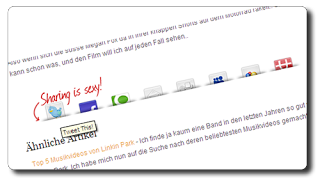
The most eye catching set of social bookmarking buttons i have seen are the ‘Sharing Is Sexy’ buttons.These buttons are embedded below your posts and have an animated effect when a user hovers their mouse over a button it pops up ready for your content to be shared.Social bookmarking is a vital too in promoting your blog as i covered in a previous postThis tutorial is a bit harder with plenty of code to be added so make sure to back up your template to see how use the link at the top of the post.
Important !
The code for this gadget no longer works as the image host no longer hosts the images.You can get the updated working version by following this link – V2 Sharing is sexy Bookmarks.
Social bookmarking is a vital too in promoting your blog as i covered in a previous post This tutorial is a bit harder with plenty of code to be added so make sure to back up your template to see how use the link at the top of the post.
Here’s how the buttons look as you see they appear just above Author and Labels

New : I have just added the same bookmarking buttons with the message ‘Sharing is caring’ in place of Sharing is sexy you can see a preview below, to get that set Click Here.
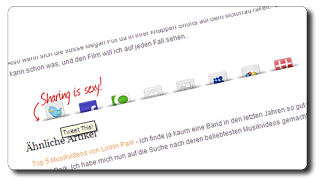
The buttons contained in the set for your readers to share your posts are for the most popular bookmarking websites :
►Delicious►Digg►Technorati►Reddit►Stumbleupon►Designflost►Facebook►Twitter►Furl
The also contain a Rss feed link and an Email link.
Here’s the steps to add the code to your blog:
——–
Code No Longer Works Go To This Post – V2 Sharing is sexy Bookmarks.
——–
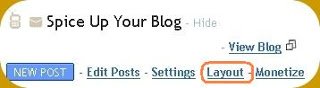
1. Click ‘Layout’–> ‘Edit html’ for your blog
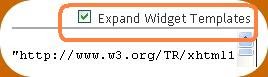
(Tick the ‘Expand widget templates’ box)

2. Find this piece of code in your blogs html:
</head>
3. Now add the code below Directly BEFORE </head>
<style type='text/css'>
div.sexy-bookmarks {
height:54px;
background:url('http://i43.tinypic.com/2ueii3t.png') no-repeat left bottom;
position:relative;
width:540px;
}

div.sexy-bookmarks span.sexy-rightside {
width:17px;
height:54px;
background:url('http://i43.tinypic.com/2ueii3t.png') no-repeat right bottom;
position:absolute;
right:-17px;
}

div.sexy-bookmarks ul.socials {
margin:0 !important;
padding:0 !important;
position:absolute;
bottom:0;
left:10px;
}

div.sexy-bookmarks ul.socials li {
display:inline-block !important;
float:left !important;
list-style-type:none !important;
margin:0 !important;
height:29px !important;
width:48px !important;
cursor:pointer !important;
padding:0 !important;
}

div.sexy-bookmarks ul.socials a {
display:block !important;
width:48px !important;
height:29px !important;
font-size:0 !important;
color:transparent !important;

}

.sexy-furl, .sexy-furl:hover, .sexy-digg, .sexy-digg:hover, .sexy-reddit, .sexy-reddit:hover, .sexy-stumble, .sexy-stumble:hover, .sexy-delicious, .sexy-delicious:hover, .sexy-yahoo, .sexy-yahoo:hover, .sexy-blinklist, .sexy-blinklist:hover, .sexy-technorati, .sexy-technorati:hover, .sexy-facebook, .sexy-facebook:hover, .sexy-twitter, .sexy-twitter:hover, .sexy-myspace, .sexy-myspace:hover, .sexy-mixx, .sexy-mixx:hover, .sexy-script-style, .sexy-script-style:hover, .sexy-designfloat, .sexy-designfloat:hover, .sexy-syndicate, .sexy-syndicate:hover, .sexy-email, .sexy-email:hover {
background:url('http://i44.tinypic.com/1znbj83.png%27') no-repeat !important;
}

.sexy-furl {
background-position:-300px top !important;
}
.sexy-furl:hover {
background-position:-300px bottom !important;
}
.sexy-digg {
background-position:-500px top !important;
}
.sexy-digg:hover {
background-position:-500px bottom !important;
}
.sexy-reddit {
background-position:-100px top !important;
}
.sexy-reddit:hover {
background-position:-100px bottom !important;
}
.sexy-stumble {
background-position:-50px top !important;
}
.sexy-stumble:hover {
background-position:-50px bottom !important;
}
.sexy-delicious {
background-position:left top !important;
}
.sexy-delicious:hover {
background-position:left bottom !important;
}
.sexy-yahoo {
background-position:-650px top !important;
}
.sexy-yahoo:hover {
background-position:-650px bottom !important;
}
.sexy-blinklist {
background-position:-600px top !important;
}
.sexy-blinklist:hover {
background-position:-600px bottom !important;
}
.sexy-technorati {
background-position:-700px top !important;
}
.sexy-technorati:hover {
background-position:-700px bottom !important;
}
.sexy-myspace {
background-position:-200px top !important;
}
.sexy-myspace:hover {
background-position:-200px bottom !important;
}
.sexy-twitter {
background-position:-350px top !important;
}
.sexy-twitter:hover {
background-position:-350px bottom !important;
}
.sexy-facebook {
background-position:-450px top !important;
}
.sexy-facebook:hover {
background-position:-450px bottom !important;
}
.sexy-mixx {
background-position:-250px top !important;
}
.sexy-mixx:hover {
background-position:-250px bottom !important;
}
.sexy-script-style {
background-position:-400px top !important;
}
.sexy-script-style:hover {
background-position:-400px bottom !important;
}
.sexy-designfloat {
background-position:-550px top !important;
}
.sexy-designfloat:hover {
background-position:-550px bottom !important;
}
.sexy-syndicate {
background-position:-150px top !important;
}
.sexy-syndicate:hover {
background-position:-150px bottom !important;
}
.sexy-email {
background-position:-753px top !important;
}
.sexy-email:hover {
background-position:-753px bottom !important;
}

</style>
4. Now find This piece of code in your blogs html :
<data:post.body/>
5. Add the code below Directly AFTER <data:post.body/>
<div class='sexy-bookmarks'>
<ul class='socials'>
<li class='sexy-delicious'><a expr:href='"http://del.icio.us/post?url=" + data:post.url + "&title=" + data:post.title' target='_blank'/></li>
<li class='sexy-digg'><a expr:href='" http://digg.com/submit?url=" + data:post.url + "&title=" + data:post.title' target='_blank'/></li>
<li class='sexy-technorati'><a expr:href='" http://technorati.com/faves?add=" + data:post.url + "&title=" + data:post.title' target='_blank'/></li>
<li class='sexy-reddit'><a expr:href='" http://www.reddit.com/submit?url=" + data:post.url + "&title=" + data:post.title' target='_blank'/></li>
<li class='sexy-stumble'><a expr:href='" http://www.stumbleupon.com/submit?url=" + data:post.url + "&title=" + data:post.title' target='_blank'/></li>
<li class='sexy-designfloat'><a expr:href='"http://www.designfloat.com/submit.php?url=" + data:post.url + "&title=" + data:post.title' target='_blank'/></li>
<li class='sexy-facebook'><a expr:href='" http://www.facebook.com/sharer.php?u=" + data:post.url + "&title=" + data:post.title' target='_blank'/></li>
<li class='sexy-twitter'><a expr:href='" http://twitthis.com/twit?url=" + data:post.url + "&title=" + data:post.title' target='_blank'/></li>
<li class='sexy-furl'><a expr:href='" http://www.furl.net/storeIt.jsp?u=" + data:post.url + "&title=" + data:post.title' target='_blank'/></li>
<li class='sexy-syndicate'><a href='ADD YOUR FEEDBURNER FEED URL HERE' title='Subscribe to RSS'/></li>
<li class='sexy-email'><a expr:href='" mailto:?subject=" + data:post.url + "&title=" + data:post.title' target='_blank'/></li>
</ul>
<span class='sexy-rightside'/></div><a href="http://www.spiceupyourblog.com" target="_blank">Get This</a>
| Remember you can get all these tips sent directly to your email and stay a step ahead.Its a quick and easy service Provided for Free by Google.Just fill in the Email form below the post. If you need extra help on this or any tutorial just leave a comment, I love comments and feedback so this Blog is Do-Follow – when you comment here it helps Your Blogs Google rank ! |
Now there is just one piece of the code you must change:
Were you see ADD YOUR FEEDBURNER FEED URL HERE
Replace with your feedburner feed
Example : http://feeds.feedburner.com/Spiceupyourblog
Click here if you Don’t have a feedburner don’t know what it is.
Once you have add your feed URL click save and the buttons have been added.
Need help, have an opinion or suggestion ? That’s what the comments are for !