

In this post i will show you how to edit your blog to allow gadgets be placed above or below your blogs header section.This is great for adding Menu bars, adsense, search bars and moreIn most blogger templates you can add gadgets to your sidebars and under or over your posts but by default not below or above the header area.You can however make a quick change to your blogs html that will allow you to add gadgets below or above your blogs header.
You can also add gadgets like adsense inside your header section Adsense In Header Blogger to see a post on this.
Take a look at how i changed this sample blog to allow the gadgets :
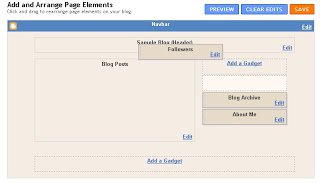
In this image you can see the gadget is not allowed below or above the header.
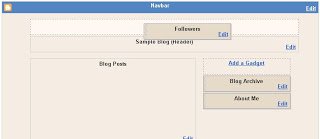
Now once the code is changed we can add gadgets above the header…..
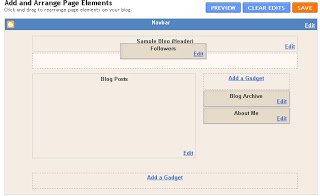
And we can also add gadgets below the header.
Heres how to make the changes :
1.Click ‘Layout’–>’Edit Html’ for your blog
2.Find the following piece of code in your blogs html :
(use ‘ctrl f’ for a search bar to find the code)
<div id="header-wrapper">
3.This is the section of code you will see under <div id=”header-wrapper”>
<div id="header-wrapper">
<b:section class="header" id="header" maxwidgets="1" showaddelement="no">
<b:widget id="Header1" locked="true" title="Sample Blog (Header)" type="Header">
</b:widget>
</b:section></div>
All you have to do is change the ‘Maxwidgets’ from ‘1’ as seen above to ‘5’ as seen below :
<div id="header-wrapper">
<b:section class="header" id="header" maxwidgets="5" showaddelement="no">
<b:widget id="Header1" locked="true" title="Sample Blog (Header)" type="Header">
</b:widget>
</b:section></div>
| We Are Nearly Finished:If you need more help or have an opinion or suggestion Please leave a comment Below.This is a Do-Follow Blog so leaving a comment will also help Your blogs Google rank. |
You could change it from 5 to as many as you want but its unlikely you would want to add more than five gadgets.

You can also add a wide gadget across the entire width of your blog under the header check it out !
Click save and your finished Gadgets can now be added above and below the header!
What do you think ?