

At the time of writing i have a 728×90 AdSense leaderboard between the header and post area on the home page of the blog.Basically i have added a gadget that spans the entire with of the layout.The default settings for this template and for lots of custom templates do not allow you to place gadgets in this area.
If your in the same position you will be glad to know changing this setting is easy.I have opened up this area for an AdSense unit but once you have changed the code you can of course add any gadgets across the top of your blog.
You may also be thinking why cant you see the AdSense leader board on this page, i recently posted a hack showing How to show gadgets on only your blogger home page or post pages.With this hack in place the leaderboard is only visible on the homepage.
Cross Column Gadgets
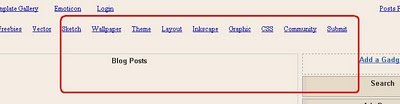
Gadgets Not Allowed – This area is called the Cross Column and the screenshot below shows there is no option to place gadgets in the cross column :
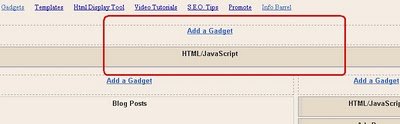
Gadgets Allowed – Once we change the code you will have a brand new ‘add a gadget‘ area :
Placing gadgets in the cross column
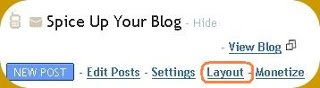
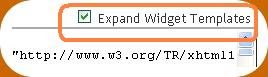
Step 1. In your dashboard Click ‘Layout’ > ‘Edit Html’ > Tick the ‘Expand Widget Templates’ box

Step 2. In your template find the following code :
(Click CTRL and F for a search bar to find the code – More Info)
<b:section class='crosscol' id='crosscol' showaddelement='no'/>
Step 3. Change Showaddelement=’no’ to Showaddelement=’yes’ as shown below :
<b:section class='crosscol' id='crosscol' showaddelement='yes'/>
Remember you can get all these tips sent directly to your email and stay a step ahead.Its a quick and easy service Provided for Free by Google.Just fill in the Email form below the post.
If you need extra help on this or any tutorial just leave a comment, I love comments and feedback so this Blog is Do-Follow - when you comment here it helps Your Blogs Google rank !
You can now save your template and return to the layout page where you will be greeted with the new ‘add a gadget’ option.
Allow Gadgets In All Available Areas
Break down the change you made – There may be other areas you can add gadgets to your layout that are blocked.The code i changed is ‘showaddelement‘ which breaks into ‘Show Add Element’.Search your template for every occurrence of ‘showaddelement’ and switch ‘no’ to ‘yes’.
You may also want to see how to put AdSense above or below your header.
More Help Is Only A Comment Away.