Tuesday, December 29, 2009

How To Place Adsense Ads Inside Your Blogger Header Section

How To Place Adsense Ads Inside Your Blogger Header Section The header section of a blog is one of the prime areas for AdSense and other ads so in this post i will show you an easy tip to place ads in your blogger header section.

This will help increase your earnings and hopefully help make you more money from your blog.

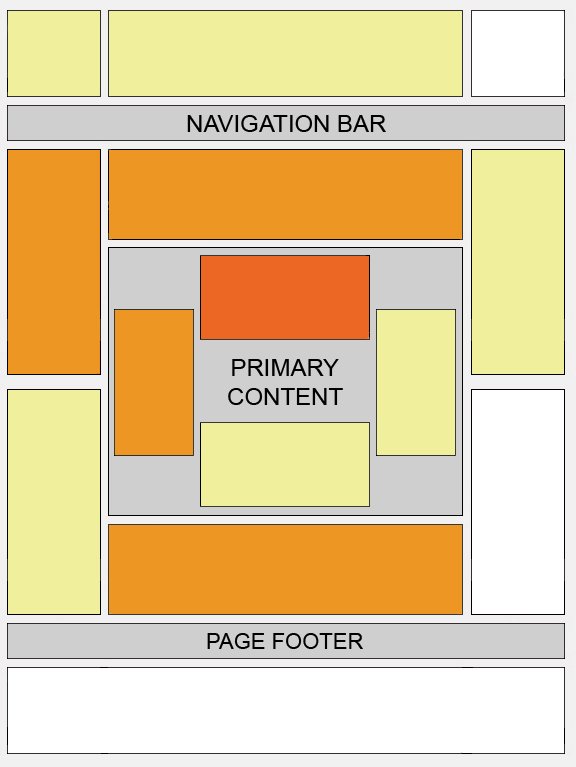
This image from Google displays the top positions for ads.

There are a number of ways to place AdSense ads in your header and i will cover other options in later posts.

In this post i will show you a nice clean and simple way to achieve this trick.

The ads will be placed differently to how i have them in my header to see a live demo of the ads in a header section click here

Here is how its done lets spice up your blog :

Getting your ad code ready.

Before you add AdSense code to your blog it must be parsed don't worry this is simple.

The first thing to do is go to your AdSense account choose the ad unit you want to use and get the code.

You now have the code copied Click Here to go to my AdSense parser .
Paste your AdSense code in to the gadget and click 'convert' now copy your new parsed code.

If the add you are adding is a simple html banner ad you don't need to parse it you can skip that step.
Placing the code in your template.

Remember you can get all these tips sent directly to your email and stay a step ahead.Its quick easy and of course a free service provided by Google just fill in the form below the post.

1.Click 'layout'-> 'Edit html' for your blog.
(Tick The 'Expand Widget Templates' Box)

Blogger layout

edit html blogger

Expand widget templates blogger


Sponser :View the great deals at Blockbuster

Two Week Free Trial

2.Find the following piece of code in your blogs html:
(Click 'Ctrl F' for a search box to find the code)

<p class='description'><span><data:description/></span></p>


3.Paste the code for your AdSense unit directly Below the code above.


Example:


<div class='descriptionwrapper'>
<p class='description'><span><data:description/></span></p>

<-----YOUR ADSENSE CODE GOES HERE----->

</div>
</b:includable>

Before we finish : If you need more help or have an opinion or suggestion Please leave a comment Below.
To help you this is a Do-Follow Blog leaving a comment will also help your blogs Google rank.


Once you have added the code click save.

The ad has now been added to your blogs header,Remember it can take up to 10 minutes for AdSense ads to show on your blog.

Have you implemented this trick and do you think it will increase your AdSense earnings? Let us know..


Jump To Comments

Subscribe To The Rss Feed Or Recieve The Latest Posts By Email

Get The Latest Full Posts By Email - It's Free
Write About Or Link To This Post On Your Blog - Easy Links :
Link Directly To This Post :

Link To The Homepage :
Hey ! People That Read This Post Also Loved These Posts
Still Looking For Something ?
Search This Blog
Custom Search
Comments : We are using Discus comments so you have more options when commenting.
If your asking a question or looking for extra help make sure to subscribe to comments by Mail and you will be notified when i reply.
blog comments powered by Disqus
 

Recommended Money Makers

1. Info Barrel Paid To Write, if you can write a blog you can write for I.B.

1. Xomba Paid To Write, Another great paid to write articles website

3. Chitika Ads For Your Blog, work well alongside AdSense

4. Aw Surveys Paid Surveys, Get paid to take surveys and referr new members.

Thanks For Calling

free counters

Admin Options : Home | Layout

Random Post List From The Archive

Who Writes This Stuff ?

Hi Im Paul Crowe,

I have an insane interest in how things work.I've been a Blogger for a long time but after an almost 2 year break i've come back with Spice Up Your Blog.

Working on Blogger design, Widgets, Gadgets and all things to do with improving the Blogger experience.Throw in some Writing and Promotion methods and we have our selves a Blog !

You cant keep a good man down..

View My Full About Me Page

Latest From Info Barrel

Want To Join In ?

Write A Guest Post On Spice Up Your Blog !
It's Easy Just Click Here For Details

Blog Archive