

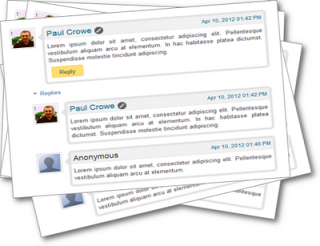
Blogger introduced Threaded comment replies to all blogger blogs early in January 2012.The option to reply directly to comments on Blogger was one of the most popular requests by Blogger users.So a great update but the style of the default blogger comments is still quiet bland.In this post we have a tutorial to add some style to Blogger comments.The Css styles we are adding places the comments in a rounded speech bubble with an arrow to the authors avatar, the reply link is also highlighted.Take a look at the demo below, scroll to the comments..

This tutorial comes courtesy of the great Noct blog, make sure to check them out.Lets add some style to your blogs comments.
Add Css Styles To Blogger Threaded Comments
Remember Always Back Up Your Template Before You Make Changes – How To Back Up A Blogger Template
Step 1. In The New Blogger Dashboard Click The Drop Down Menu For Your blog And Choose > Template > Under your blogs screenshot choose “Edit Html” > Then Proceed, as shown in the video below.
Step 2. Find the following piece of code in your blogs Html : (Click Ctrl and F for a search bar to help find the code – How To Find Code In Blogger Template Template)
]]></b:skin>
Step 3. Copy and Paste the following code Directly Above / Before ]]></b:skin>
/* Start Comment Style Code http://www.spiceupyourblog.com */
.comments{clear:both;margin-top:10px;margin-bottom:0;font-family:Arial;line-height:18px;font-size:13px}
.comments .comments-content{margin-bottom:16px;font-weight:normal;text-align:left}
.comments .comment .comment-actions a,.comments .comment .continue a{display:inline-block;margin:0 0 10px 10px;padding:0 15px;color:#424242 !important;text-align:center;text-decoration:none;background:#fede72;border:1px solid #fec648;border-radius:2px;height:26px;line-height:28px;font-weight:normal;cursor:pointer}
.comments .comments-content .comment-thread ol{list-style-type:none;padding:0;text-align:none}
.comments .comments-content .inline-thread{padding:0}
.comments .comments-content .comment-thread{margin:8px 0}
.comments .comments-content .comment-thread:empty{display:none}
.comment-replies{margin-top:1em;margin-left:40px;background:#fff}
.comments .comments-content .comment{margin-bottom:0;padding-bottom:0}
.comments .comments-content .comment:first-child{padding-top:16px}
.comments .comments-content .comment:last-child{border-bottom:0;padding-bottom:0}
.comments .comments-content .comment-body{position:relative}
.comments .comments-content .user{font-style:normal;font-weight:normal}
.comments .comments-content .user a{color:#0E6284;font-weight:normal;text-decoration:none}
.comments .comments-content .icon.blog-author{width:18px;height:18px;display:inline-block;margin:0 0 -4px 6px}
.comments .comments-content .datetime a{color:#0E6284;font-size:12px;float:right;text-decoration:none}
.comment-content{margin:0 0 8px;padding:0 5px}
.comment-header{font-size:18px;background-color:#f1f1f1;border-bottom:1px solid #e3e3e3;padding:5px}
.comments .comments-content .owner-actions{position:absolute;right:0;top:0}
.comments .comments-replybox{border:none;height:230px;width:100%}
.comments .comment-replybox-thread{margin-top:0}
.comments .comment-replybox-single{margin-top:5px;margin-left:48px}
.comments .comments-content .loadmore a{display:block;padding:10px 16px;text-align:center}
.comments .thread-toggle{cursor:pointer;display:inline-block}
.comments .comments-content .loadmore{cursor:pointer;max-height:3em;margin-top:0}
.comments .comments-content .loadmore.loaded{max-height:0;opacity:0;overflow:hidden}
.comments .thread-chrome.thread-collapsed{display:none}
.comments .thread-toggle{display:inline-block}
.comments .thread-toggle .thread-arrow{display:inline-block;height:6px;width:7px;overflow:visible;margin:0.3em;padding-right:4px}
.comments .thread-expanded .thread-arrow{background:url("data:image/png;base64,iVBORw0KGgoAAAANSUhEUgAAAAc AAAAHCAYAAADEUlfTAAAAG0lEQVR42mNgwAfKy8v/48I4FeA0AacVDFQBAP9wJkE/KhUMAAAAAElFTkSuQmCC") no-repeat scroll 0 0 transparent}
.comments .thread-collapsed .thread-arrow{background:url("data:image/png;base64,iVBORw0KGgoAAAANSUhEUgAAA AcAAAAHCAYAAADEUlfTAAAAJUlEQVR42mNgAILy8vL/DLgASBKnApgkVgXIkhgKiNKJ005s4gDLbCZBiSxfygAAAAB JRU5ErkJggg==") no-repeat scroll 0 0 transparent}
.avatar-image-container{background:url(https://lh5.googleusercontent.com/-Wmy6bwNKzbo/T0miLZkuJsI/AAAAAAAAChc/orbwMGHyBxA/s51/arrow.png) top right no-repeat;float:left;vertical-align:middle;overflow:hidden;width:65px !important;height:51px !important;max-width:65px !important;max-height:51px !important}
.comments .avatar-image-container img{padding:2px;border:1px solid #ccc;width:45px !important;height:45px !important;max-width:45px !important;max-height:45px !important}
.comments .comment-block{margin-left:65px;position:relative;border:5px solid #e3e3e3;border-radius:8px}
@media screen and (max-device-width:480px){.comments .comments-content .comment-replies{margin-left:0}}
/* End Comment Style Code http://www.spiceupyourblog.com */
Step 4. Save your template.

That’s it check out your blog comments with some cool new styles, All credits go to Noct Blog.Make sure to check out more of our Blog Comments Tips And Tutorials.
Drop Your Comments And Questions Below.