Within this blog we talk a lot about making changes to your template by editing the html that makes it up. Something i quickly realised is that changes don’t always work first time so its vital to be able to revert back to the template before you made changes.
I do this in one of two ways :
1.Save to hard drive.
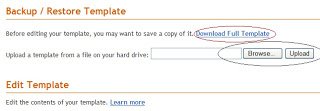
Simply click the “Download full template” option above the html area.
You will get a small window pop up,click “save” then save it (just save it to documents).
Then if your not happy with the changes you made instead of having to rummage through all the code again to discard the changes just click the browse button above your template html select the template as you just saved it upload and your back as you were.
2.Save to Notepad
Every computer has a notepad build in here’s how to access it :
1.Click start menu (Bottom left of your screen)
2.From your start menu click all programmes
3.You get another menu just click accessories
4. In the accessories menu choose notepad.
Copy the code all from your template and paste it into notepad.Then If the changes you make to your template don’t suit simply swap the code you saved to notepad back into the html area and save.
Important – Make Sure To Tick The ‘Expand Widget Templates Box’ Before You Copy The Code And Tick It Again Before Putting Code Back
If you have any questions drop a comment below !