

The blogger navbar is standard on all blogger templates.Some don’t mind it personally i don’t like it.Removing it is easier than you might think.In fact i have this Blogger tip down to three easy steps for you.
Remove The Blogger Navbar
Update 25-07-2012 – Blogger have now added a simple option for this : How To Turn Off The Blogger NavBar.
Step 1. In your Blogger dashboard click Design > Edit Html.
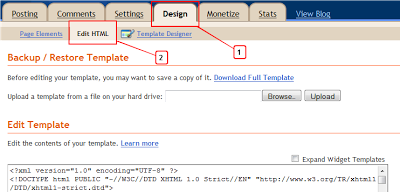
2.Copy the code below :
#navbar-iframe { display: none !important;}
3.Place it in your blogs html below the template details (found very close to the top of you html) and just above /* Variable definitions as displayed below:
-----------------------------------------------
Blogger Template Style
Name: Minima Stretch
Designer: Douglas Bowman / Darren Delaye
URL: www.stopdesign.com
Date: 26 Feb 2004
----------------------------------------------- */

#navbar-iframe { display: none !important;} <---- Just Below Template Details


/* Variable definitions
====================
If you don’t want to completely remove the navbar you can make it into a ‘Hover Effect’ so it will only appear when you place your cursor over the navbar area :
Make a hover effect navbar
Victory Teachers Blog – Asked in the comments : “If i hide this tool bar – how do i then access the edit buttons?”
Great question, What i use is a link in the footer to my dashboard.
Once your logged in to your account any link to the Blogger homepage will bring you to your homepage.
So just add this code to your sidebar or footer :
<a href="http://www.blogger.com" target="_blank">Blogger</a>
Now you can click this to get to your dashboard.
You can also add a link to your ‘Create a post’ page and ‘Layout Page’.

In your dashboard click ‘New Post’ then copy the URL address in the address bar at the top of your screen :

Now put that URL into a link as shown below :
<a href="PUT-URL-HERE">New Post</a>
Replace PUT-URL-HERE with the URL you copied from your new post page.
You can do the same for your layout page, settings page or any page.Don worry about putting links to your pages on your profile only people logged into your account will be able to access them.
Drop Your Comments And Questions Below.
What My Robot Recommends:
- Automatically Post Your YouTube Videos On WordPress And Blogger
- Adding Post Titles To Older Post Newer Post Links On Blogger
- How To Add Footer Columns On Blogger To Display Labels
- Change The Size Of Blogger Profile Picture In About Me Gadget
- How To Make All Text On Your Blog Lowercase, Capitalized Or Uppercase