

Many newspapers make the first letter of their articles a feature.I’m sure you have seen newspaper articles with a large first letter that stretches down four or five lines, with the text wrapped around the large letter.I have heard this called a drop cap or newspaper effect but for the want of a better term we will call it the large letter effect.And with this blogger tip you can have this cool large letter effect on your blog posts.
To get the first letter of your blog posts large and wrapped in text you must add a small piece of code to your template and a tag to the first letter in your posts.This blog trick is easy set up and you can use it on all future posts or go back and make a slight change to your archive posts so they have the large letter effect.
Screenshot of large letter in blog post :
Note – We have an easier update version of this effect here – A Simple Way To Use A Drop Cap Large First Letter On Your Blog.
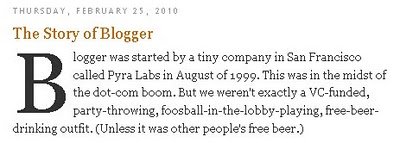
You can see the post this screenshot is from here : Large Letter Effect
Using The Large Letter Effect On Blogger
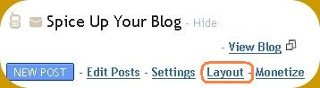
Step 1. In your dashboard click ‘Layout’ > ‘Edit Html’

Step 2. Find the following code in your blogs html :
(Click Ctrl and F for a search bar to find the code – More Info)
]]></b:skin>
Step 3. Place this code Directly Above / Before ]]></b:skin>
.post large { float:left; color: $headerBgColor; font-size:100px; line-height:80px; padding-top:1px; padding-right:5px; }
Step 4. Save your template – But were not finished
Step 5. You now have the code in your template that will allow the effect to be created, but now we must add a tag to the letter we want to have the large effect.
To do this you add the following tag to the first letter in your posts :
<large>FIRST LETTER HERE</large>
In the example i showed above the letter B is large so i placed the tags on each side of B :
<large>B</large>logger
You could of course start every paragraph with a large letter or selected paragraphs with the large letter effect.
| Remember you can get all these tips sent directly to your email and stay a step ahead.Its a quick and easy service Provided for Free by Google.Just fill in the Email form below the post. If you need extra help on this or any tutorial just leave a comment, I love comments and feedback so this Blog is Do-Follow – when you comment here it helps Your Blogs Google rank ! |
Save Time By Adding The Tags To Your Post Template
You can now use your post template to have the large tags automatically added to each post thus saving time.

1.Click Settings > Formatting
2.Scroll to the bottom of the page were you will locate the post template setting
3.Add the tags <large></large> into the post template area and save.Now every time you create a new post the large tags will already be in place you just put the first letter between them.
If you wish to use the effect on your older posts you will have edit the posts and add the large tags.
If you have any problems help is only a comment away !
I think its a great effect and add some style to your blog posts, what do you think ?