

In this post i will share with you a function available to you on blogger that allows you to edit add and remove labels to all your blog posts or selected posts at once. This is a feature i don’t think many are aware of and can save a lot of time and effort if you wish to manage your labels. So i think the best way to do this is to show you how to add a label to all your blog posts at once explaining with screen shots as i go. Then i will explane how to add or remove labels in just a number of selected posts .
Lets do it:
OK so i have decided to add a label to all my posts here’s how i do it:
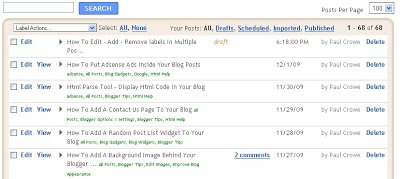
1.Click ‘Edit posts’ for your blog you will go to this page:
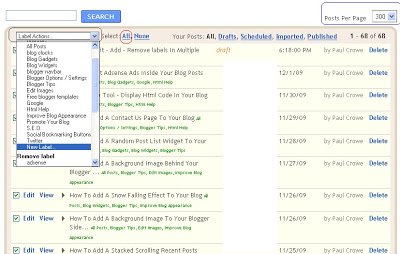
2.To add our new label we do the following:
(See image below)
*Set the ‘posts per page’ in the top right to 300.
*In the top left click select ‘All’.
*Click the ‘Label actions..’ drop down menu.
*Choose ‘New Label..’
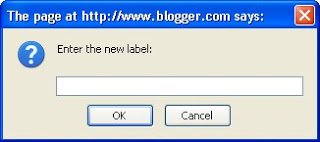
3.You will get this pop up window:
*Enter the new label in the area provided and click OK.
*Your new label has been added to all your posts.
To remove a label from all your posts:
Simply follow the steps above but this time..
When you click the ‘Label Actions’ Drop down menu scroll down to ‘Remove Label’
Select the label you wish to remove, it will be automatically removed from all your posts.
Add or remove labels from selected posts.
If you want to edit labels on just a few selected posts:

Instead of clicking ‘select all’ click the check box beside the posts you want to add or remove labels to as shown below :
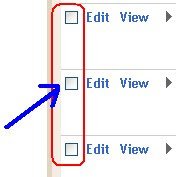
Now use the drop down menu to add or remove labels to those posts.
This should help speed up the process of editing the labels on you blog.
If you need more help leave a comment below.