

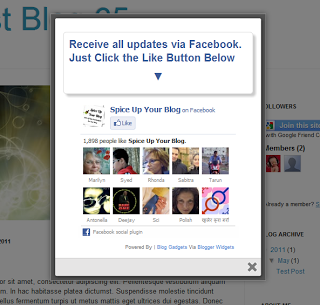
For this i have used the gadget from the great MyBloggerTricks making just a few small changes.Check out the demo and screenshot below.
Remember Always Back Up Your Template Before You Make Changes - How To Back Up A Blogger Template
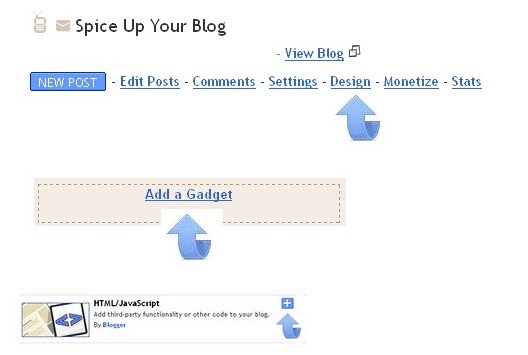
Step 1. In Your Blogger Dashboard Click Design > Add a gadget > Choose html/javascript.


Step 2. Copy and Paste the following code into the Html/Javascript gadget, there is a lot of code make sure to get it all :
Important - This is a scroll box make sure to get all the code.
<style>

/*
ColorBox Core Style:
The following CSS is consistent between example themes and should not be altered.
*/
#colorbox, #cboxOverlay, #cboxWrapper{position:absolute; top:0; left:0; z-index:9999; overflow:hidden;}
#cboxOverlay{position:fixed; width:100%; height:100%;}
#cboxMiddleLeft, #cboxBottomLeft{clear:left;}
#cboxContent{position:relative;}
#cboxLoadedContent{overflow:auto;}
#cboxTitle{margin:0;}
#cboxLoadingOverlay, #cboxLoadingGraphic{position:absolute; top:0; left:0; width:100%;}
#cboxPrevious, #cboxNext, #cboxClose, #cboxSlideshow{cursor:pointer;}
.cboxPhoto{float:left; margin:auto; border:0; display:block;}
.cboxIframe{width:100%; height:100%; display:block; border:0;}
/*
User Style:
Change the following styles to modify the appearance of ColorBox. They are
ordered & tabbed in a way that represents the nesting of the generated HTML.
*/
#cboxOverlay{background:#000;opacity:0.5 !important;}
#colorbox{
box-shadow:0 0 15px rgba(0,0,0,0.4);
-moz-box-shadow:0 0 15px rgba(0,0,0,0.4);
-webkit-box-shadow:0 0 15px rgba(0,0,0,0.4);
}
#cboxTopLeft{width:14px; height:14px; background:url(http://1.bp.blogspot.com/-FiJ_Xz7txEg/Txrt0sy1TiI/AAAAAAAAFWk/Llzvkeyy_J8/s1600/controls.png) no-repeat 0 0;}
#cboxTopCenter{height:14px; background:url(http://1.bp.blogspot.com/-TcJGMnSfOCY/TxrtzzHDLVI/AAAAAAAAFWc/mdndgrisRuA/s1600/border.png) repeat-x top left;}
#cboxTopRight{width:14px; height:14px; background:url(http://1.bp.blogspot.com/-FiJ_Xz7txEg/Txrt0sy1TiI/AAAAAAAAFWk/Llzvkeyy_J8/s1600/controls.png) no-repeat -36px 0;}
#cboxBottomLeft{width:14px; height:43px; background:url(http://1.bp.blogspot.com/-FiJ_Xz7txEg/Txrt0sy1TiI/AAAAAAAAFWk/Llzvkeyy_J8/s1600/controls.png) no-repeat 0 -32px;}
#cboxBottomCenter{height:43px; background:url(http://1.bp.blogspot.com/-TcJGMnSfOCY/TxrtzzHDLVI/AAAAAAAAFWc/mdndgrisRuA/s1600/border.png) repeat-x bottom left;}
#cboxBottomRight{width:14px; height:43px; background:url(http://1.bp.blogspot.com/-FiJ_Xz7txEg/Txrt0sy1TiI/AAAAAAAAFWk/Llzvkeyy_J8/s1600/controls.png) no-repeat -36px -32px;}
#cboxMiddleLeft{width:14px; background:url(http://1.bp.blogspot.com/-FiJ_Xz7txEg/Txrt0sy1TiI/AAAAAAAAFWk/Llzvkeyy_J8/s1600/controls.png) repeat-y -175px 0;}
#cboxMiddleRight{width:14px; background:url(http://1.bp.blogspot.com/-FiJ_Xz7txEg/Txrt0sy1TiI/AAAAAAAAFWk/Llzvkeyy_J8/s1600/controls.png) repeat-y -211px 0;}
#cboxContent{background:#fff; overflow:visible;}
#cboxLoadedContent{margin-bottom:5px;}
#cboxLoadingOverlay{background:url(http://1.bp.blogspot.com/-PPvu-446sn4/Txrt1QsGH1I/AAAAAAAAFWw/_jWYVoR1HX8/s1600/loading-background.png) no-repeat center center;}
#cboxLoadingGraphic{background:url(http://1.bp.blogspot.com/-31strss_1-E/Txrt1J6NThI/AAAAAAAAFWo/4P12CJPj924/s1600/loading.gif) no-repeat center center;}
#cboxTitle{position:absolute; bottom:-25px; left:0; text-align:center; width:100%; font-weight:bold; color:#7C7C7C;}
#cboxCurrent{position:absolute; bottom:-25px; left:58px; font-weight:bold; color:#7C7C7C;}
#cboxPrevious, #cboxNext, #cboxClose, #cboxSlideshow{position:absolute; bottom:-29px; background:url(http://1.bp.blogspot.com/-FiJ_Xz7txEg/Txrt0sy1TiI/AAAAAAAAFWk/Llzvkeyy_J8/s1600/controls.png) no-repeat 0px 0px; width:23px; height:23px; text-indent:-9999px;}
#cboxPrevious{left:0px; background-position: -51px -25px;}
#cboxPrevious.hover{background-position:-51px 0px;}
#cboxNext{left:27px; background-position:-75px -25px;}
#cboxNext.hover{background-position:-75px 0px;}
#cboxClose{right:0; background-position:-100px -25px;}
#cboxClose.hover{background-position:-100px 0px;}
.cboxSlideshow_on #cboxSlideshow{background-position:-125px 0px; right:27px;}
.cboxSlideshow_on #cboxSlideshow.hover{background-position:-150px 0px;}
.cboxSlideshow_off #cboxSlideshow{background-position:-150px -25px; right:27px;}
.cboxSlideshow_off #cboxSlideshow.hover{background-position:-125px 0px;}
/*-----------------------------------------------------------------------------------*/
/* Facebook Likebox popup For Blogger
/*-----------------------------------------------------------------------------------*/
#subscribe {
font: 12px/1.2 Arial,Helvetica,san-serif; color:#666;
}
#subscribe a,
#subscribe a:hover,
#subscribe a:visited {
text-decoration:none;
}
.box-title {
color: #3B5998;
font-size: 20px !important;
font-weight: bold;
margin: 10px 0;
border:1px solid #ddd;
-moz-border-radius:6px;
-webkit-border-radius:6px;
border-radius:6px;
box-shadow: 5px 5px 5px #CCCCCC;
padding:10px;
line-height:25px; font-family:arial !important;
}
.box-tagline {
color: #999;
margin: 0;
text-align: center;
}
#subs-container {
padding: 35px 0 30px 0;
position: relative;
}
a:link, a:visited {
border:none;
}
.demo {
display:none;
}
</style>
<script type="text/javascript">
jQuery(document).ready(function(){
if (document.cookie.indexOf('visited=true') == -1) {
var fifteenDays = 1000*60*60*24*30;
var expires = new Date((new Date()).valueOf() + fifteenDays);
document.cookie = "visited=true;expires=" + expires.toUTCString();
$.colorbox({width:"400px", inline:true, href:"#subscribe"});
}
});
</script>
<!-- This contains the hidden content for inline calls -->
<div style='display:none'>
<div id='subscribe' style='padding:10px; background:#fff;'>
<h3 class="box-title">Receive all updates via Facebook. Just Click the Like Button Below<center><p style="line-height:3px;" >▼</p></center></h3>
<center>
<iframe src="//www.facebook.com/plugins/likebox.php?href=http%3A%2F%2Fwww.facebook.com%2Fspiceupyourblog&width=300&colorscheme=light&show_faces=true&border_color=%23ffffff&stream=false&header=false&height=258" scrolling="no" frameborder="0" style="border:none; overflow:hidden; width:300px; height:258px;" allowtransparency="true"></iframe>
</center>
<p style=" float:right; margin-right:35px; font-size:9px;" >Powered By | <a style=" font-size:9px; color:#3B78CD; text-decoration:none;" href="http://www.spiceupyourblog.com">Blog Gadgets</a> Via <a style=" font-size:9px; color:#3B78CD; text-decoration:none;" href="http://www.mybloggertricks.com">Blogger Widgets</a></p>
</div>
</div>
/*
ColorBox Core Style:
The following CSS is consistent between example themes and should not be altered.
*/
#colorbox, #cboxOverlay, #cboxWrapper{position:absolute; top:0; left:0; z-index:9999; overflow:hidden;}
#cboxOverlay{position:fixed; width:100%; height:100%;}
#cboxMiddleLeft, #cboxBottomLeft{clear:left;}
#cboxContent{position:relative;}
#cboxLoadedContent{overflow:auto;}
#cboxTitle{margin:0;}
#cboxLoadingOverlay, #cboxLoadingGraphic{position:absolute; top:0; left:0; width:100%;}
#cboxPrevious, #cboxNext, #cboxClose, #cboxSlideshow{cursor:pointer;}
.cboxPhoto{float:left; margin:auto; border:0; display:block;}
.cboxIframe{width:100%; height:100%; display:block; border:0;}
/*
User Style:
Change the following styles to modify the appearance of ColorBox. They are
ordered & tabbed in a way that represents the nesting of the generated HTML.
*/
#cboxOverlay{background:#000;opacity:0.5 !important;}
#colorbox{
box-shadow:0 0 15px rgba(0,0,0,0.4);
-moz-box-shadow:0 0 15px rgba(0,0,0,0.4);
-webkit-box-shadow:0 0 15px rgba(0,0,0,0.4);
}
#cboxTopLeft{width:14px; height:14px; background:url(http://1.bp.blogspot.com/-FiJ_Xz7txEg/Txrt0sy1TiI/AAAAAAAAFWk/Llzvkeyy_J8/s1600/controls.png) no-repeat 0 0;}
#cboxTopCenter{height:14px; background:url(http://1.bp.blogspot.com/-TcJGMnSfOCY/TxrtzzHDLVI/AAAAAAAAFWc/mdndgrisRuA/s1600/border.png) repeat-x top left;}
#cboxTopRight{width:14px; height:14px; background:url(http://1.bp.blogspot.com/-FiJ_Xz7txEg/Txrt0sy1TiI/AAAAAAAAFWk/Llzvkeyy_J8/s1600/controls.png) no-repeat -36px 0;}
#cboxBottomLeft{width:14px; height:43px; background:url(http://1.bp.blogspot.com/-FiJ_Xz7txEg/Txrt0sy1TiI/AAAAAAAAFWk/Llzvkeyy_J8/s1600/controls.png) no-repeat 0 -32px;}
#cboxBottomCenter{height:43px; background:url(http://1.bp.blogspot.com/-TcJGMnSfOCY/TxrtzzHDLVI/AAAAAAAAFWc/mdndgrisRuA/s1600/border.png) repeat-x bottom left;}
#cboxBottomRight{width:14px; height:43px; background:url(http://1.bp.blogspot.com/-FiJ_Xz7txEg/Txrt0sy1TiI/AAAAAAAAFWk/Llzvkeyy_J8/s1600/controls.png) no-repeat -36px -32px;}
#cboxMiddleLeft{width:14px; background:url(http://1.bp.blogspot.com/-FiJ_Xz7txEg/Txrt0sy1TiI/AAAAAAAAFWk/Llzvkeyy_J8/s1600/controls.png) repeat-y -175px 0;}
#cboxMiddleRight{width:14px; background:url(http://1.bp.blogspot.com/-FiJ_Xz7txEg/Txrt0sy1TiI/AAAAAAAAFWk/Llzvkeyy_J8/s1600/controls.png) repeat-y -211px 0;}
#cboxContent{background:#fff; overflow:visible;}
#cboxLoadedContent{margin-bottom:5px;}
#cboxLoadingOverlay{background:url(http://1.bp.blogspot.com/-PPvu-446sn4/Txrt1QsGH1I/AAAAAAAAFWw/_jWYVoR1HX8/s1600/loading-background.png) no-repeat center center;}
#cboxLoadingGraphic{background:url(http://1.bp.blogspot.com/-31strss_1-E/Txrt1J6NThI/AAAAAAAAFWo/4P12CJPj924/s1600/loading.gif) no-repeat center center;}
#cboxTitle{position:absolute; bottom:-25px; left:0; text-align:center; width:100%; font-weight:bold; color:#7C7C7C;}
#cboxCurrent{position:absolute; bottom:-25px; left:58px; font-weight:bold; color:#7C7C7C;}
#cboxPrevious, #cboxNext, #cboxClose, #cboxSlideshow{position:absolute; bottom:-29px; background:url(http://1.bp.blogspot.com/-FiJ_Xz7txEg/Txrt0sy1TiI/AAAAAAAAFWk/Llzvkeyy_J8/s1600/controls.png) no-repeat 0px 0px; width:23px; height:23px; text-indent:-9999px;}
#cboxPrevious{left:0px; background-position: -51px -25px;}
#cboxPrevious.hover{background-position:-51px 0px;}
#cboxNext{left:27px; background-position:-75px -25px;}
#cboxNext.hover{background-position:-75px 0px;}
#cboxClose{right:0; background-position:-100px -25px;}
#cboxClose.hover{background-position:-100px 0px;}
.cboxSlideshow_on #cboxSlideshow{background-position:-125px 0px; right:27px;}
.cboxSlideshow_on #cboxSlideshow.hover{background-position:-150px 0px;}
.cboxSlideshow_off #cboxSlideshow{background-position:-150px -25px; right:27px;}
.cboxSlideshow_off #cboxSlideshow.hover{background-position:-125px 0px;}
/*-----------------------------------------------------------------------------------*/
/* Facebook Likebox popup For Blogger
/*-----------------------------------------------------------------------------------*/
#subscribe {
font: 12px/1.2 Arial,Helvetica,san-serif; color:#666;
}
#subscribe a,
#subscribe a:hover,
#subscribe a:visited {
text-decoration:none;
}
.box-title {
color: #3B5998;
font-size: 20px !important;
font-weight: bold;
margin: 10px 0;
border:1px solid #ddd;
-moz-border-radius:6px;
-webkit-border-radius:6px;
border-radius:6px;
box-shadow: 5px 5px 5px #CCCCCC;
padding:10px;
line-height:25px; font-family:arial !important;
}
.box-tagline {
color: #999;
margin: 0;
text-align: center;
}
#subs-container {
padding: 35px 0 30px 0;
position: relative;
}
a:link, a:visited {
border:none;
}
.demo {
display:none;
}
</style>
<script src='http://ajax.googleapis.com/ajax/libs/jquery/1.5/jquery.min.js'></script>
<script src="http://yourjavascript.com/11215013191/jquery.colorbox-min.js"></script><script type="text/javascript">
jQuery(document).ready(function(){
if (document.cookie.indexOf('visited=true') == -1) {
var fifteenDays = 1000*60*60*24*30;
var expires = new Date((new Date()).valueOf() + fifteenDays);
document.cookie = "visited=true;expires=" + expires.toUTCString();
$.colorbox({width:"400px", inline:true, href:"#subscribe"});
}
});
</script>
<!-- This contains the hidden content for inline calls -->
<div style='display:none'>
<div id='subscribe' style='padding:10px; background:#fff;'>
<h3 class="box-title">Receive all updates via Facebook. Just Click the Like Button Below<center><p style="line-height:3px;" >▼</p></center></h3>
<center>
<iframe src="//www.facebook.com/plugins/likebox.php?href=http%3A%2F%2Fwww.facebook.com%2Fspiceupyourblog&width=300&colorscheme=light&show_faces=true&border_color=%23ffffff&stream=false&header=false&height=258" scrolling="no" frameborder="0" style="border:none; overflow:hidden; width:300px; height:258px;" allowtransparency="true"></iframe>
</center>
<p style=" float:right; margin-right:35px; font-size:9px;" >Powered By | <a style=" font-size:9px; color:#3B78CD; text-decoration:none;" href="http://www.spiceupyourblog.com">Blog Gadgets</a> Via <a style=" font-size:9px; color:#3B78CD; text-decoration:none;" href="http://www.mybloggertricks.com">Blogger Widgets</a></p>
</div>
</div>
Important - You have two ways to make it work for your blog, firstly Change spiceupyourblog highlighted in yellow with your facebook username.Find more information on creating a professional Facebook page and username here.Or if your page does not have a simple username you can create your like box here and replace the code in bold above with the code you get.
Important 2 - If you already have jQuery script in your template remove the line in red.
That's it a cool Facebook pop up widget that will surly increase your facebook fan count.Thanks again to MBT for the original gadget.Make sure to check out more of our Facebook Tips And Gadgets.
Drop Your Comments And Questions Below.
If You Enjoyed This Post Please Take 5 Seconds To Share It.


Great!!! is there any way to show customization in mobile theme, like adding fb like button...
ReplyDeleteFrom my experience.. this gadget won't work if our template contains javascript 1.4.2 .. is there any way to fix it, Paul?
ReplyDeleteThanx!!
ReplyDeleteI have patiently waited for this and have now implemented it in my blog-it works!
Thanx 4 ur awesome work.
Forgot to ask... do you mind doing a tutorial on the different ways one can make their blog header (the part with the 'HOME' 'CONTACT' 'ABOUT'...) look as good as yours? Thanx!
ReplyDeleteThanks , It Works! This is the thing I'm finding for! ^^
ReplyDeleteit keeps telling me to verify the correct href ?
ReplyDeleteThere is some problem, in the style code or script; because blogger shows "Your template could not be parsed as it is not well-formed. Please make sure that all XML elements are closed properly.
ReplyDeleteXML error message: The entity name must immediately follow the '&' in the entity reference.
Error 500"
Any suggestion?
Ankit go to Layout> Add Gadget> Add HTML/Java script.
DeleteThen copy all the code above and paste it.Now go to facebook.com and then get the code for you page. Click on Iframe tab and copy it. Replace the code in bold with the new Iframe code you have got.
Save.
View blog.
To view that box again, delete the cookies of you browser.
@ Jason and Ankit - I checked the code again and it's working fine, ther is a lot of code so make sure you get it all.
ReplyDeleteThanks Admin!
DeleteI will try it
Thanks Mr. Paul! You made my day!
DeleteI've added the code completely (double checked) but it doesn't work. Please check it out
ReplyDeletehttp://www.electrokill.info
its nice widget..thanks but please tell me..how do it shows to visitor once on everyday.?
ReplyDeleteHello,
ReplyDeleteWill this code for a drupal site?
Or can we modify it to work for that?
Will this still work if the Facebook page doesn't have a "username"? It says you are only eligible for a username once you have 25 fans. Can I just use the URL instead? Thanks, this is really cool.
ReplyDeleteYour demo's not working for me - not quite sure why.
ReplyDeleteAlso, can you explain how you can be sure it's one-time-only? Is it based on cookies (so will come back when they're cleared), or something else?
@ Eric - I visited your site and the pop up was there working fine.You will need to clear your cookies to see it again.
ReplyDelete@ Mary C - It uses cookies, you may have visited it before i had the demo on that page for a week before i published this post.
@ AK - This is set up for blogger although you could get it to work on other sites.
Hi there, I'm still wondering now if I can use this with my facebook page's URL. I tried adding it that way, and the box pops up but something is wrong with the href.
ReplyDeleteCould you please let me know if it is possible to use this if my facebook page doesn't have a username and only a URL?
projectprocrastinot.blogspot.com
thank you! it works, i'm customizing my new second blog. its a big help. good job!
ReplyDeleteOk, I figured out how to do it, I think, but how do we check to make sure it works if it's only a one time thing?
ReplyDeleteThanks again! I am loving the helpful info I find here and will keep coming back.
Hey I've cleared my cookies and used two different browsers, replaced your url with mine and it's still not working. It says the href is incorrect?
ReplyDeleteSir, i didn't said that code is wrong , or there are error;
ReplyDeleteBlogger shows error( which i wrote above) while saving the css code.
Works fine when css code is linked using external stylesheet.
Great widget. I'm gonna incorporate this one on my blog: http://blogverize.blogspot.com
ReplyDeleteGreat widget! It worked GREAT!!!!! But my slider stopped working afterwards. Any solutions? Please? Thanks!!!!!
ReplyDeletehello sir. ty for the codes. it works find on me. but i want the closebox to be delete and put a timer on it . or else, others cant read my blog. its like forcing people to like my page first. hehe.can it be done?
ReplyDeleteVery nice widget.
ReplyDeleteWould you know how to use this on a wordpress powered site?
Awesome widget
ReplyDeleteHello there...
ReplyDeletei have just installed this widget and checked the code.. but its not working on my blog please help
www.techamy.blogspot.com
The code is definitely working as it's the same as in the demo.Remember you will only see this once unless you clear your cookies..
DeleteI've added subscription pop up instead of this. How have you added photos against names in comment section? Thanks!
ReplyDeleteIt Works but the slider tab has stock-up. :(
ReplyDeleteThank you very very very much , Its working Greatttttttttttttttt in my blog (http://fbcovers123.blogspot.com/
ReplyDeleteThank you for the widget! It works great. Is there any way to activate it on the page exit?? That would be even better!
ReplyDeleteA very big thanks to you.
ReplyDeletenice post. working great.
if any one has doubt can check @ www.zipgamez.blogspot.com
Thanks alot mate!!!! for this beautiful and helpfull javascript.. working fine!!! thumbs up!!!
ReplyDeleteThank you for this great widget Paul. It's perfectly working but the thing is, the moving images from my blog won't move anymore, that's why I removed the pop-up, is there anything else I can do? My website is -- thesexyblogger.blogspot.com ;D
ReplyDelete♥ x0x0xD, (.Sm69.)
The Sexy Blogger
Hi Marc, I would think this is because you have the jQuery script in your template twice.I have highlighted the jQuery code in this post, it's the line in red, remove that and save then it should not clash with your slider..
DeleteHi Paul thanks for your reply ;D I tried it too, still, it won't work, I tried to use it back -- now it never work with or without the jQuery script.. so really sad about it.. but thanks anyways ;D
Delete♥ x0x0xD, (.Sm69.)
The Sexy Blogger
hello paul in my template i have a slider and after i put this widget it stop to work
ReplyDeletei have search the net, most of the people say that its in json not in jquery
Thanks for the amazing Tweak. [techchasse.blogspot.in]
ReplyDeleteReally Nice Post. Thanks! =)
ReplyDeleteis it possible to let it pop up on every Home Page load?Why does it pop up 1 times only?
ReplyDeleteis it possible to let it pop up on every Home Page LOAD?
ReplyDeleteTo have it appear every time remove *30 from this section - var fifteenDays = 1000*60*60*24*30;
Deletefollowed the steps.Did not work.i tried refreshing the website but pop up box didn't appear.Please advise.
DeleteThis comment has been removed by the author.
ReplyDeletepaul is there anyway to make the popup auto close after readers click LIKE my fanpage?
ReplyDeleteI'm afraid not akid...
Deletethere is a problem with me i replace the facebook username correctly with my facebook username but it says wrong username do some thing help me
ReplyDeletethere is a problem with me to apply this gadget i replace the facebook username but it says wrong username but i replace it correctly helped
ReplyDeletethanks its work for me
ReplyDeleteGreat Job! :D
ReplyDeletehello can anyone help i did what you said but it does not appear once someone opens my blog.
ReplyDeletethis is my blogspot can you please check it for me
geektutor.blogspot.com
thankyou
great post...
ReplyDeletenice. it works on my blog. just a curious question, does it has an effect on my adsense ads. i mean like a violation on adsense TOS.
ReplyDeleteNo this does not effect AdSense TOS.
DeleteWhatever,Thanks For This Gadget
ReplyDeleteThis works fine but what if i want to show popup every time..
ReplyDeleteSeriously ! If you did that you would see your numbers go down big time, that would drive me crazy !
Deleteits working i love it
ReplyDeletecool blog...itz working http://songhut.blogspot.in/ in my blog
ReplyDeleteHeya..! thnx...My blog " nitroxbikez.blogspot.com " looks more HOT now......
ReplyDelete;p
You are great!! Thanks for this awesome informtion!!
ReplyDeleteHello, I love reading through your blog, I wanted to leave a little comment to support you and wish you a good continuation. Wish you best of luck for all your best efforts. best of luck
ReplyDeletenot working for me dude .. :(
ReplyDeleteAkshay, once the code is added clear the cache on your computer and check again.Remember it only shows up once, that may be why your not seeing it..
DeleteI love reading like this type of stuff and wanna search reads as like this. Thanks for sharing such creative things.
ReplyDeleteSearched the whole net but couldnt find it. Thanks a lot.
ReplyDeletewww.techytk.blogspot.in
See it working here
I added this code to my blog,http://e-books-freedownload.blogspot.in/
ReplyDeletebut it is not displaying. I dont know why, pls help me paul
I have friends that tried putting this on their blogs who are now upset with me because they say that it pops up everytime others come to visit it and their readers are complaining. What do I tell them to do to fix this, or, what settings do they have that are causing this to pop up at each entry of the page.
ReplyDeleteMmmm it didn't work in my blogger... what am I doingg wrong? the gadget is added and saved but nothing happens...
ReplyDeleteThis comment has been removed by the author.
ReplyDeletethanks
ReplyDeletei cannt english
ReplyDeletesaya mengucapkan bnyak terimksi sama kamu, berkat kmu saya thu
hi i just viewed the demo of this script, i have found out that the pop up goes away when a user clicks on outside the the pop-up, could you make it stay on a page unless the user actually clicks the like button??
ReplyDeleteHi Sandy, I could set it up like this but I am totally against this kind of 'Click to get in' format.
DeletePersonally if I landed on a site were I had to like or follow to enter I would close the window and never return.I think most people would feel the same and instead of adding followers to your blog it could have the exact oppisite effect.
Anyway that's my opinion and why I have not set up this gadget like that.
nice info...
ReplyDeletethanks for this information...:)
ReplyDeleteI am Searching many blogs But your Post Solve My Problem Thank YOu very Much. JazakAllah
ReplyDeleteThank you Sir.! This widget will be more helpful if you also add subscription through email.. :-)
ReplyDeleteFirst time it work but now the days not showing this what is the problem
ReplyDeletewww.samjhanakophool.blogspot.com
Thanks a lot.
ReplyDeletebut i want to disable out side of the colorbox when i click
Is there any way it can be modified to make it pop-up on 2nd page view?
ReplyDeleteNow working for my blog :(
ReplyDeleteDo you know if there is any other plugin, or any option you could add to this one, to show the pop up only to users who are still not fans!!!
ReplyDeleteThanks!
Amazing !!!! I have Done it :)
ReplyDeleteThanks Really Nice
ReplyDeleteHi,
ReplyDeletePreviously it was working and now suddenly it stopped working. Can you please check and let me know?
Its working on my blog thank you...!!!
ReplyDeleteyour pop up is working fine but my slider and drop down menu is not working.
ReplyDeleteand if i remove the code in RED color. then my slide and drop down menu works but pop up doesn't . please help ........
it did work for my site but after i added pop up codes,, my blog slider stop working :( ... is there any ideas to fix that,,,please replay me as soon as you read my comment
ReplyDeleteThe jQuery code must be in your template twice.When you add the code remove the line in red.
Deletethank you
ReplyDeleteI already put the PopUp, but it only popups once, how do I make it to popup everytime that I enter the blog?
ReplyDeleteYou want people who have already made the option to like or not like your FB page to see this every time they view a page on your blog ?
DeleteIf you do that you will drive away traffic, your site bounce rate will go through the roof and with recent Google updates your search traffic will also be effected.
Still want to do it ?
Oh, I didn't think about that, well I thing you're right, huh, thanks for the answer :D
Deletethank you! this works. now my blog looks cool. hahahah.
ReplyDeletebtw, i changed the iframe src //www.facebook.com/plugins/LIKEBOX.php to //www.facebook.com/plugins/LIKE.php and put the href= just to like the blog not the facebook page. am i doing it right?
you're awesome. thank you!
ReplyDeleteThis doesnt seem to work for me since I had to remove the the jQuery script line in red. I had to erase it because it interfered with my jQuery slide thats on my homepage. It prevented the slider from working correctly. Is their some way I can still implement the code in my blogger without it messing with my jQuery slider?
ReplyDeleteit doesn't work for my blog :(((
ReplyDeleteGood Day,
ReplyDeleteyour FB pop up doesnt work for my blog. Although i played with the Jquery. Remove and added. Changing FB username but still don't appear. what's the problem? any idea?
best,
Mark
Hey would you mind letting me know which webhost you’re utilizing? I’ve loaded your blog in 3 completely different web browsers and I must say this blog loads a lot faster then most. Can you suggest a good internet hosting provider at a honest price? Thank you,I appreciate it!
ReplyDeletehttp://www.facebookilike.com/
thank you so nice no distabence of it soooooooo gooooood
ReplyDeleteHi, Nice post but unfortunately after i add this code my theme sliders and drodowm menus are not working for my site (www.xdeem.com), please help me out.... i would like to add this. advance thanks.
ReplyDeletereally Works Like A Charm,Thanks A Lot
ReplyDeleteThanks for this Paul, 'just added it to my blog and it works nicely. Hopefully this will help increase the number of facebook likes.
ReplyDeleteHow can I change its appearing time before than a month?
ReplyDeleteNice Post. 100% working. Thanks.
ReplyDeletethanks for sharing, nice post
ReplyDeleteI've tried it in dynamic views seems not working. Does it work in dynamic views? anybody tried?
ReplyDeleteThanks for the post and the code, really helpful.
ReplyDeleteCan you also modify this to follow when scrolling, because now it is not.
good tutorial, 100% work for my blog! thank you!
ReplyDeleteTHANKSSSSSSSS WORKED GREAT......!!!!!!!!!
ReplyDeleteAwesome pop up.
ReplyDeleteworking very fine.. keep up your good work bro
ReplyDeleteThanks a lot, found exactly what i was looking for
ReplyDeleteHello, this is a great gadget, but i got one huge problem, when i put it in my blog, my slider stops working and just shows the first image of the slider. This is my blog---> http://www.arkouda.gr/ and i would need some help fast please :(
ReplyDeleteYour post seems good as I have added a like box to my blogger blog. Now I need to remove its border. Can you please help me?
ReplyDeleteAmazing POPUP Box i think this widget should help us to increase fans :D
ReplyDeletethanks admin.its working
ReplyDeleteThanks, works great! Easy!!!
ReplyDeleteThanks this works perfect for me :)
ReplyDeleteI have added the code. Its working. Thanks.
ReplyDeleteThanks for this widget! IT IS AWESOME!
ReplyDeletehi. can i change a location of pop up window? i want this window to upear a bit on the right?
ReplyDeleteThanks for this widget :)
ReplyDeleteHey! Mine isn't showing no matter how I try. Please reply.
ReplyDeleteThanks, this is exactly what we were looking for.
ReplyDeleteI put it on my wordpress website but its not working there plz guide me
ReplyDeletewt if i want it to wait 60 seconde before appearing , so that the visiter can read and appreciate some good content first ... ?
ReplyDelete