


So many blogs and websites i visit these days have implemented a pop up subscription form for their newsletter.I'm sure you have seen it, you land on a site and after a few seconds a form appears asking for your Email to subscribe.While these can annoy some people they have been proven to have a dramatic effect on the numbers of subscribers.In this post i will show you how to add a similar form to your Blogger blog but with a form to subscribe to your blog via Email Rss provided by feedburner.The form is a one time pop up so if someone visits your blog every day it will remember they visited before and not show the form again.
This tutorial was originally posted on the excellent Simplex Design blog so make sure to check them out.Below you can see a live demo.

Add The Pop Up Subscription Box To Blogger
Remember Always Back Up Your Template Before You Make Changes - How To Back Up A Blogger Template
Step 1. In Your Blogger Dashboard Click Design > Edit Html
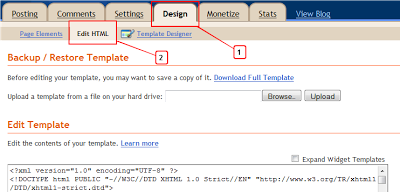
Step 2. Find the following piece of code in your blogs Html : (Click Ctrl and F for a search bar to help find the code - How To Find Code In Blogger Template Template)
]]></b:skin>
Step 3. Copy and Paste the following code Directly Above / Before ]]></b:skin>
Note - This is a scroll box make sure to get all the code.
#popupContactClose{
cursor: pointer;
text-decoration:none;
}
#backgroundPopup{
display:none;
position:fixed;
_position:absolute; /* hack for internet explorer 6*/
height:100%;
width:100%;
top:0;
left:0;
background:#000000;
border:1px solid #cecece;
z-index:1;
}
#popupContact{
display:none;
position:fixed;
_position:absolute; /* hack for internet explorer 6*/
height:384px;
width:408px;
background:#FFFFFF;
border:2px solid #cecece;
z-index:2;
padding:12px;
font-size:13px;
}
#popupContact h1{
text-align:left;
color:#6FA5FD;
font-size:22px;
font-weight:700;
border-bottom:1px dotted #D3D3D3;
padding-bottom:2px;
margin-bottom:20px;
}
#popupContactClose{
font-size:14px;
line-height:14px;
right:6px;
top:4px;
position:absolute;
color:#6fa5fd;
font-weight:700;
display:block;
}
/*End Subscription Pop Up Css @ http://www.spiceupyourblog.com */
Step 4. Find the following piece of code in your blogs Html : (Click Ctrl and F for a search bar to help find the code - How To Find Code In Blogger Template Template)
</head>
Step 5. Now Copy And Paste This Code Directly Above / Before </head>
<!--Pop Up Subscription-->
<script src='https://ajax.googleapis.com/ajax/libs/jquery/1.5.0/jquery.min.js' type='text/javascript'/>
<script src='http://yourjavascript.com/8296222511/jquery.cookies.2.2.0.min.js' type='text/javascript'/>
<script type='text/javascript'>
var popupStatus = 0;
//loading popup with jQuery magic!
function loadPopup(){
centerPopup();
//loads popup only if it is disabled
if(popupStatus==0){
$("#backgroundPopup").css({
"opacity": "0.7"
});
$("#backgroundPopup").fadeIn("slow");
$("#popupContact").fadeIn("slow");
popupStatus = 1;
}
}
//disabling popup with jQuery magic!
function disablePopup(){
//disables popup only if it is enabled
if(popupStatus==1){
$("#backgroundPopup").fadeOut("slow");
$("#popupContact").fadeOut("slow");
popupStatus = 0;
}
}
//centering popup
function centerPopup(){
//request data for centering
var windowWidth = document.documentElement.clientWidth;
var windowHeight = document.documentElement.clientHeight;
var windowscrolltop = document.documentElement.scrollTop;
var windowscrollleft = document.documentElement.scrollLeft;
var popupHeight = $("#popupContact").height();
var popupWidth = $("#popupContact").width();
var toppos = windowHeight/2-popupHeight/2+windowscrolltop;
var leftpos = windowWidth/2-popupWidth/2+windowscrollleft;
//centering
$("#popupContact").css({
"position": "absolute",
"top": toppos,
"left": leftpos
});
//only need force for IE6
$("#backgroundPopup").css({
"height": windowHeight
});
}
//CONTROLLING EVENTS IN jQuery
$(document).ready(function(){
if ($.cookie("anewsletter") != 1) {
//load popup
setTimeout("loadPopup()",5000);
}
//CLOSING POPUP
//Click the x event!
$("#popupContactClose").click(function(){
disablePopup();
$.cookie("anewsletter", "1", { expires: 7 });
});
//Click out event!
$("#backgroundPopup").click(function(){
disablePopup();
$.cookie("anewsletter", "1", { expires: 7 });
});
//Press Escape event!
$(document).keypress(function(e){
if(e.keyCode==27 && popupStatus==1){
disablePopup();
$.cookie("anewsletter", "1", { expires: 7 });
}
});
});
</script>
<!--End Pop Up Subscription @ http://www.spiceupyourblog.com -->
Step 6. Find the following piece of code in your blogs Html : (Click Ctrl and F for a search bar to help find the code - How To Find Code In Blogger Template Template)
</body>
Step 7. Copy and Paste the following code Directly Above / Before </body>

<div id='popupContact'>
<a id='popupContactClose'>x</a>
<h1>Get Our Latest Posts Via Email - It's Free</h1>
<p id='contactArea'><form action='http://feedburner.google.com/fb/a/mailverify' method='post' onsubmit='window.open('http://feedburner.google.com/fb/a/mailverify?uri=SpiceUpYourBlog', 'popupwindow', 'scrollbars=yes,width=550,height=520');return true' style='border:1px solid #ccc;padding:3px;text-align:center;' target='popupwindow'><p>Enter your email address:</p><p><input name='email' style='width:140px' type='text'/></p><input name='uri' type='hidden' value='SpiceUpYourBlog'/><input name='loc' type='hidden' value='en_US'/><input type='submit' value='Subscribe'/><p>Delivered by <a href='http://feedburner.google.com' target='_blank'>FeedBurner</a></p></form></p>
</div>
<div id='backgroundPopup'/>
Important - You need to change our feedburner username with yours.The username for your feed can be found at the end of your feed URL.For example the our feedburner URL is http://feeds.feedburner.com/SpiceUpYourBlog , with SpiceUpYourBlog being the username.
That's it all thanks go to Simplex Design.
Drop your comments and questions below.


demo link is broken
ReplyDelete@ Ahmad - Thanks for the heads up i have fixed it..
ReplyDeleteI've tried it two times on two different blogs for a total of four times. I can't make it work. Could the sliders be interfering? I seem to have a lot of problems with certain widgets and I think it's the slider/carousels on each blog.
ReplyDeleteHello Paul,
ReplyDeleteI have a pop up box using light box, it looks similar to the popup domination thingy, i can send you the files via email in code, you can share them with your readers, the only problem is that i am not a coder, the code is some how conflicting with the scripts on my site, so i removed them, but if you test these scripts out you will love them, i want to put the code back on my site but i can't unless a coder like your self can fix the problem
-Thanks
-TheEmoLab
[please reply]
not working properly its saying "form" must be followed by ">" or "/>"
ReplyDeleteonce say clearly and shall we replace spiceupmyblog.com with our blog address tell clearly
Thank u!
friend,it is not working!!!
ReplyDeleteHi Paul,
ReplyDeletethanks for your great article first two step coding I added successfully but that 3rd step i have tried many times to my blog it showing below error message. what is the problem. my blog www.techshortly.com
We were unable to save your template
Please correct the error below, and submit your template again.
Your template could not be parsed as it is not well-formed. Please make sure all XML elements are closed properly.
XML error message: Element type "form" must be followed by either attribute specifications, ">" or "/>".
@ All - There seems to have been a problem with the code in step 7, i have changed it and it should be OK now.
ReplyDeleteThank you.
ReplyDeleteI used it on my blog
@ All
ReplyDelete- You can also use the HTML encoder/decoder to stop errors
- http://centricle.com/tools/html-entities/
- Thanks
- TheEmoLab
dear friend, kindly please update this article as soon as possible!!
ReplyDeletei'm waitung for your updates!!!
already,so many worpress users are using this type of email pop-ups...
thanks in adcvance...
- ROHINI KUMAR
hi Paul,
ReplyDeleteI was very happy to see this post, as I wanted to add this feature to my blog but, it is not working properly for me :( The subscription pop up doesn't come also I noticed it appears at the bottom of my page.
Kindly provide a fix soon.
Thanks.
Hi Paul,
ReplyDeleteCan you teach me how to make a "Do you like this article" box below blogger post just like in way2blogging.org, its below his "related post". Cuz mine is just a simple "Do you like this article" box with "Like" button, I want to make use of the free space by adding rss subscription and social networking buttons.
thanks for the info..
ReplyDeletei am searching for this thing from a long time and its the only one on this blog over the internet world lolx..
ReplyDeletebut bro i think there is something missing because its not working properly.
please update this
Cool beans, thanks Paul.
ReplyDeleteI have installed this and even modified it a little so the message and color matches my blog better.
I did notice one issue that wasn't 100% clear. I have never used feedburner thus it the feedburner widget wasn't already installed. Obviously that caused an error, but once I installed the feedburner widget and then reintegrated the three segments of code it worked perfectly.
It might have been common knowledge for most that the feedburner widget needed to be installed prior to implementing these codes but I have been messing with this stuff for only 3 weeks and I didn't know. Just a friendly suggestion that it be mentioned.
Thanks again Paul for a great post.
Jaime
For some reason on one of my blogs it works normally but on the other one it's deformed ;( not sure why?
ReplyDeletevery informative post...thanks for sharing..!!
ReplyDeletethank you for sharing n I loved your post
ReplyDeletenothing happens i have been using mozilla firefox 7
ReplyDeletei have done all the steps
but still it doesn't works can you please help me
my blog address nsmsolutions.blogpsot.com
now i have even changed the theme but it doesn't work
ReplyDeletecan you help please
@Ankit
ReplyDeleteI went to both of the sights listed in your blogger profile. Your main sight (tips sight) it didn't work but on your demo sight it popped up with Chrome, Firefox, Internet Explorer, and Safari. Just figured I would let you know.
Use this code instead of Step 7...
ReplyDelete<div id='popupContact'>
<a id='popupContactClose'>x</a>
<h1>Get Our Latest Posts Via Email - It's Free</h1>
<p id='contactArea'><form action='http://feedburner.google.com/fb/a/mailverify' method='post' onsubmit='window.open('http://feedburner.google.com/fb/a/mailverify?uri=AccountancyStudents', 'popupwindow', 'scrollbars=yes,width=550,height=520');return true' style='border:1px solid #ccc;padding:3px;text-align:center;' target='popupwindow'><p>Enter your email address:</p><p><input name='email' style='width:140px' type='text'/></p><input name='uri' type='hidden' value='AccountancyStudents'/><input name='loc' type='hidden' value='en_US'/><input type='submit' value='Subscribe'/><p><a href='http://twitter.com/AccountancySS' target='_blank'><img alt='Twitter' src='http://2.bp.blogspot.com/-oFF4HrEbwaI/To9NpETr6dI/AAAAAAAAEJk/jowvXNvTKcY/s1600/twitter.png' title='Twitter'/></a><a href='http://www.facebook.com/AccountancyBlog' target='_blank'><img alt='Facebook' src='http://4.bp.blogspot.com/-O6nMA1_akTo/To9NmwKzo4I/AAAAAAAAEJU/UFiFTyAJbnw/s1600/facebook.png' title='Facebook'/></a><a href='https://plus.google.com/110237960309870392424' target='_blank'><img alt='Google Plus' src='http://3.bp.blogspot.com/-NbS3DZVbHU0/To9NnX6odTI/AAAAAAAAEJY/SvIFghHPw-k/s1600/gplus.png' title='Google Plus'/></a><a href='http://www.linkedin.com/groups?about=&gid=4087740' target='_blank'><img alt='LinkedIn' src='http://3.bp.blogspot.com/-bzutYp7uln0/To9Nn2z36jI/AAAAAAAAEJc/-_kgc1MkEB4/s1600/linkedin.png' title='LinkedIn'/></a><a href='http://feeds.feedburner.com/AccountancyStudents' target='_blank'><img alt='RSS Feed' src='http://1.bp.blogspot.com/-SLbNOLbWhs0/To9NoZ-cOHI/AAAAAAAAEJg/uRl444L2fyg/s1600/rss.png' title='RSS Feed'/></a><a href='mailto:support@accountancystudents.net' target='_blank'><img alt='Email' src='http://1.bp.blogspot.com/-zyZkki5OJqE/To9Nmf1xb8I/AAAAAAAAEJQ/dlUOxjZ0H5U/s1600/email.png' title='Email'/></a></p>
<p>Delivered By<a href='http://feedburner.google.com' target='_blank'>FeedBurner</a><a href='http://feeds.feedburner.com/AccountancyStudents'><img alt='' height='26' src='http://feeds.feedburner.com/~fc/AccountancyStudents?bg=ffffff&fg=000000&anim=1&label=listeners' style='border:0' width='88'/></a></p></form></p>
</div>
<div id='backgroundPopup'/>
Thanks admin ..... its working now... Awesome tutorial........
ReplyDeletewhat if i want to add some background to it nad make it stylish??? can u send me the code for it???
ReplyDeleteThanks, Paul. I had no issues installing, however, the pop-up frequency, although set to 7 days, pops up numerous times each day. How might I fix that?
ReplyDeleteThanks!
Nice Job Paul. It's working, and I'll see how it affects my feed subscribers vs. my visitor stats.
ReplyDeleteIf I could make it electric blue with a loud bang when it pops up..that would also be nice.
hey Paul,
ReplyDeleteI tried this again in my blog, but now I'm getting a transparent window at the extreme left of the screen, also is there a way to make the window stay where it is e1 if the user scrolls down. My blog url is www. techgom.com I request you to kindly look into the code and tell me how to fix it.
Not work for me :( it said: It was not possible to analyze your model, as it is not structured properly. Please make sure all XML elements required to carry the closing tag.
ReplyDeleteXML error message: The element type "body" must be terminated by the matching end-tag "".
It's working great for me. My only question is: Which part do I edit to change the font color? Baby-blue is very not my style. =)
ReplyDeleteHi friend facebook like box in this method please help me
ReplyDeleteHi admin i am waiting for facebook box code
ReplyDeleteThanks Admin for helping me now it worked perfect for me.
ReplyDeleteI agree with @prasnt. I have a Facebook page linked to my blog, and I would like a one-time message to appear that asks the reader to like the blog's Facebook page.
ReplyDeleteI think that this would be a very popular feature that many bloggers would choose to use.
Thanks for your help in advance!
Best,
Jacob
This is nice post which I was awaiting for such an article and I have gained some useful information from this site. Thanks for sharing this information.
ReplyDeleteI like this post. Very nice information. Thanks for sharing your knowledge
ReplyDeleteNice post. It really help me. Thanks.
ReplyDeleteI added it and noticed that it stopped my slider...any ideas?
ReplyDeleteThanks!
Many thanks for the exciting blog posting! I really enjoyed reading it, you are a brilliant writer. I actually added your blog to my favorites and will look forward for more updates. Great Job, Keep it up..
ReplyDeleteDo you know if there is any way to override Feedburner's delivery time-windows?! I would like the email to go out to the subscribers as soon as I've updated...
ReplyDeletecan u give the code for this pop up to work everytime user logs in?? plz help
ReplyDeleteWe have a problem with my slider....the pop up stop the photo slider ¿solve?
ReplyDeletethanks for your great info
ReplyDeleteget your free domains at freedomains.in
Can i have a one time facebook like box when any one visits my blog.??? plz help me out in this..
ReplyDeleteLove this, but is there a source for this script besides http://dinhquanghuy.110mb.com/
ReplyDeleteThat site keeps going down slowing down the load time on my blog...
I added this to my blog but for some reason it's transparent and positioned on the left. How can I change this? THANKS!
ReplyDeletethanks for the info..
ReplyDeleteHi Paul, is there a way for me to host the javascript file from http://dinhquanghuy.110mb.com/ myself so I don't have to rely on that site? I have a place to put it, just wasn't sure how to get it there and modify the code...
ReplyDeleteThanks!
Thank you for this great tutorial.
ReplyDeleteI implemented it on my blog at http://myearbooks.blogspot.com and all seemed well at first.
However, I noticed that while the pop-up worked just fine, my featured posts image slider failed to work as it did before I added the code.
To test the theory (to ensure that I had not accidentally edited the slider code) I simply removed the code for the pop up. Sure enough the image slider functioned correctly once again.
Is there some incompatibility between your code and the code for my image slider?
I would very much appreciate a response as I would love to use your code for this feature on my blog.
thank you in advance.
http://dinhquanghuy.110mb.com/ is down again! Will have to use a different method as this one is pretty much worthless since when that site goes down it makes my site load incredibly slow.
ReplyDeleteChanged it Jon..
DeleteThanks Paul.
Deletelink broken in your demo blog...It would be great if you kindly update it!!
ReplyDeletewww.friedtech.co.in
Will give it a try too. Its a nice where to start from article/. Bravo
ReplyDeleteThanks so much for this great info and I really so much like it.
ReplyDeleteany plugin for word press ???
ReplyDeleteNice widget
ReplyDeleteThanks you.
Thanks Paul for this tutorial, I can use this code in one of my professional sites not in my hobby sites (blogspot), my idea is to put RSS email subscriptions plus Facebook fan page. However, it can only make my blog to load slowly because of script.
ReplyDeleteYou have a lot of helpful blogger customization tutorial here at spiceupyourblog.com, when it comes to blogger customization, I only visit your blog when I need something to fix on my blog.
One thing i can't find online is how to create a related post with a snippet, let's say post title plus 100 characters post summary (for related post).
I will going to find that, if I couldn't find one, I will going to check spiceupyourblog.com and look for it.
Thanks Paul, you're an awesome blogger.
Not working on my site, lifefromadeerstand.com. Any help would be appreciated.
ReplyDeleteDakota, you understand it will only be shown to people once on your site; on their first visit.I took a quick look at your site and there is a subscribe by email pop up, this may have blocked the Facebook pop up.
Deleteyipeee its working on my site..
ReplyDeleteTips & Tricks