
One of the options the default blogger comments lack is the option to reply to an individual comment.In fact it was one of the reasons i changed from blogger comments to Disqus comments.I have however come across a cool blogger hack that will enable comment replies for blogger.
Update – We have since aded an Updated version of this with a selection of Reply Buttons and styles.Check it out here – Add Reply Button To Blogger Comments.
With a small piece of code your comments will include a reply option.This cool tutorial was originally posted on thisischen.com.
ScreenShot :

You can see a quick demo of the effect on this blog : Demo Blog – Comment replies
This is a really helpful blogger trick and you have have the comment reply option on your blog in just three steps !
Adding Comment Replies To Blogger
Step 1. In your dashboard Click ‘Design’ > ‘Edit Html’> Tick the ‘Expand Widget templates’ box
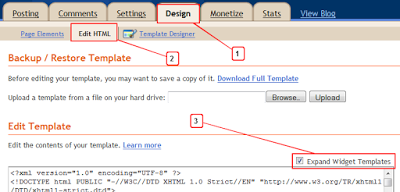
Step 2. Find the following code in your blogs Html :
(Click Ctrl and F for a search bar to help find the code – More Info, Blogger Basics)
<data:commentPostedByMsg/>
Step 3. Paste the following code Directly Below/After <data:commentPostedByMsg/>

<a href='http://www.spiceupyourblog.com'><img alt='Best Blogger Tips' src='http://3.bp.blogspot.com/_rKG-ziTSNUQ/TQ5eV0U0EiI/AAAAAAAACik/xo2eFaDbfrE/s1600/best+blogger+tips.png'/></a><span class='comment-reply'><a expr:href='"https://www.blogger.com/comment.g?blogID=YOUR-BLOG-ID&postID=" + data:post.id + "&isPopup=true&postBody=%40%3C%61%20%68%72%65%66%3D%22%23" + data:comment.anchorName + "%22%3E" + data:comment.author + "%3C%2F%61%3E#form"' onclick='javascript:window.open(this.href, "bloggerPopup", "toolbar=0,location=0,statusbar=1,menubar=0,scrollbars=yes,width=400,height=450"); return false;'>[Reply to comment]</a></span><a href='http://www.bestbloggertemplates.net'><img alt='Best Blogger Templates' src='http://3.bp.blogspot.com/_rKG-ziTSNUQ/TQ5eV0U0EiI/AAAAAAAACik/xo2eFaDbfrE/s1600/best+blogger+tips.png'/></a>
Edits :You must make one change to the code – In order for the gadget to display the posts for your blog you must add your blogger I.D.
To find your Blogger I.D. simply go to your layout page, posting page or any of the pages you access from your dashboard and copy your I.D. from the address bar at the top of the page.
Your Blog I.D. is a the number that appears in the URL – This is how your I.D. will be displayed :

Once you have your blog I.D. added save your template and the comment replies have been added.