

One of the options the default blogger comments lack is the option to reply to an individual comment.In fact it was one of the reasons i changed from blogger comments to Disqus comments.I have however come across a cool blogger hack that will enable comment replies for blogger.
Update Jan 2012 - Blogger have added this as default find out more here - Threaded Comment Replies Added To All Blogger Comment Forms.
ScreenShot :

You can see a quick demo of the effect on this blog : Demo Blog - Comment replies
This is a really helpful blogger trick and you have have the comment reply option on your blog in just three steps !
Adding Comment Replies To Blogger
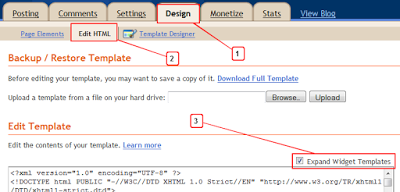
Step 1. In Your (New Design) Blogger Dashboard Click The Drop Down Menu For Your Blog > Choose Template > Then Edit Html > Now Proceed > Tick The Expand Widget Templates Box as shown in the video Below :
Step 2. Find the following code in your blogs Html :
(Click Ctrl and F for a search bar to help find the code - More Info, Blogger Basics)
<data:commentPostedByMsg/>
Step 3. Paste the following code Directly Below/After <data:commentPostedByMsg/>

<a href='http://www.spiceupyourblog.com'><img alt='Best Blogger Tips' src='http://3.bp.blogspot.com/_rKG-ziTSNUQ/TQ5eV0U0EiI/AAAAAAAACik/xo2eFaDbfrE/s1600/best+blogger+tips.png'/></a><span class='comment-reply'><a expr:href='"https://www.blogger.com/comment.g?blogID=YOUR-BLOG-ID&postID=" + data:post.id + "&isPopup=true&postBody=%40%3C%61%20%68%72%65%66%3D%22%23" + data:comment.anchorName + "%22%3E" + data:comment.author + "%3C%2F%61%3E#form"' onclick='javascript:window.open(this.href, "bloggerPopup", "toolbar=0,location=0,statusbar=1,menubar=0,scrollbars=yes,width=400,height=450"); return false;'>[Reply to comment]</a></span><a href='http://www.bestbloggertemplates.net'><img alt='Best Blogger Templates' src='http://3.bp.blogspot.com/_rKG-ziTSNUQ/TQ5eV0U0EiI/AAAAAAAACik/xo2eFaDbfrE/s1600/best+blogger+tips.png'/></a>
Edits : You must make one change to the code - In order for the gadget to display the posts for your blog you must add your blogger I.D.
To find your Blogger I.D. simply go to your layout page, posting page or any of the pages you access from your dashboard and copy your I.D. from the address bar at the top of the page.
Your Blog I.D. is a the number that appears in the URL - This is how your I.D. will be displayed :

Once you have your blog I.D. added save your template and the comment replies have been added.

Check out more of the great posts we have with Tips and Tricks for Blog Comments Here.
Drop Your Comments And Questions Below.
If You Enjoyed This Post Please Take 5 Seconds To Share It.


This is a great tutorial for a much-needed option, thank you.
ReplyDeleteHere's the problem I'm running into: I assume this only works when you have the comment setting to embed directly beneath posts, and not the pop up or full page option. I've been having problems with getting the embed setting to actually work, and I finally had to "revert widgets to default settings" in Edit html. It thankfully worked without messing up my 3rd party template (which surprised me), so now comments are embedded beneath my post and working fine.
However.....when I search for to do the reply to comment button, that code is not found anywhere since I've reverted all widgets to default.
Is there something that I've missed? This is my site: http://stevensrants2.blogspot.com/
Any help is much appreciated.
Thanks for taking the time to discuss this, I feel strongly about it and really like learning more on this matter. If possible, as you gain expertise, would you mind updating your blog with more details? It is extremely helpful for me.
DeleteTombstone
Thanks for posting such informative article.keep posting.
Deletethanks
Deletemany thanks for posting
DeleteI did exactly what you're saying. but the problem occurs when I want to reply...
Deletehttp://www.sercansolmaz.com/p/video.html
Once I click on it, a pop up window appears and I get a 'Webpage cannot be found' ..Not sure what exactly I did wrong?
ReplyDeletesame problem on my blog... Did you find where the problem
Deletesercansolmaz@gmail.com
If you are getting this error I would think you added you blog ID incorrectly ...
Deletei added Id number correctly .i get it from adress bar when edit my blogger
DeleteHi Other people have had the same problem and it's usually because they have added their Blog ID incorrectly.Try again and make sure you get the ID exactly as shown in the tutorial.
ReplyDeletePaul.
Thank you so much!
Deletegreat jog buddy! thanks a lot!! it works so good
ReplyDeleteThank you for the tips :)
ReplyDeleteThanks so much! I know nothing about Hmtl, but this was super-easy.
ReplyDeleteWow great work Emily, it's not a 'super-easy' tutorial to follow !
ReplyDeletethis is what i've been searching, thanks for this nice and eassy tutorial
ReplyDeleteTrue
DeleteThank you so much for your tutorial.
ReplyDeletehttp://gail-theneedleandtheveil.blogspot.com/
i got the same 404 error...
ReplyDelete@ Amy - If you get the 404 error it's because you have not entered the Blog Id correctly.Try again and make sure you add the id as shown in the post..I'm sure you can do it !
ReplyDeletehttp://paradiseofcomics.blogspot.com/
ReplyDeletelook at my blog there is nothing like ""
help
Thanks so much for the easy directions! Question: is the person who left the comment notified of the reply?
ReplyDelete@ Cherise - I'm Afraid they are not which sucks ! You can see i have a message above the comment form telling people to subscribe for the replies and that's about the best you can do.If you go to your blogger settings > Comments settings you will see a section to add a message above your comment form..
ReplyDeleteThank you so much, I have been looking for this since july <3
ReplyDelete@ Claire Im Glad you found us and got your comment replies !
ReplyDeleteI'm a bit disappointed the the reply doesn't appear directly below the post I'm replying to....can that be done?
ReplyDeletealso, I had the same error message then realized that I was only susposed to put the numbers in my blog ID not the whole address.
@Paul this trick is best, but the reply icon only shown when we are logged in blogger account... can you make it possible for all readers....
ReplyDeleteProBogBooster.com
@ Cindy - you are looking for treaded comments and i'm afraid at the moment that cant be achieved.
ReplyDelete@Vinayak - You dont need a Blogger account to Reply To A comment.Make sure yo have your comment settigs to 'Anyone can comment', i should have set that on the demo.
Paul.
Paul, thank you so much for this. Like Cindy, I was hoping for "treaded comments" but beggers can't be choosers so I'll take what I can get. It really is a helpful tool and I appreciate the lesson.
ReplyDeleteTake care.
Your Friend, m.
Hi, is there any way to avoid using a popup box and, instead, have the replies start in the box embedded below the post?
ReplyDeleteSuperb blog post, I have book marked this internet site so ideally I’ll see much more on this subject in the foreseeable future!
ReplyDeleteI used this for my blog; it works great! Thank you so much for the easy-to-follow tutorial!! :D
ReplyDeleteHello, I've been wanting to add a reply button for a wehile and this was so easy to follow. However, I only have a reply button on the first comment - is it possible to have one on each reply?
ReplyDeleteMy blog - http://hazelsworldofjoy.blogspot.com/
Thanks!
Oh, its working now... thanks!
ReplyDeletethanx, you are so brilliant!
ReplyDeletehaha, it's great... thanks :D
ReplyDeleteWorks great! Thanks a bunch! One question is if it's possible to indent the reply comment?
ReplyDeletegreat!!!
ReplyDeleteThanks for this! I'm having a hard time finding where to put it (I'm on an iPad and can't search with ctrl f) but I'm sure once I find it, it will be great!
ReplyDeletehmmm, I did this and no problems, but I don't see any reply option has appeared.
ReplyDeletekissofsun.blogspot.com
Is there a way for the original commenter to get an e-mail notifying that their comment has been replied to?
ReplyDeleteThis is great - thanks a lot! Just wish I could make them appear right under the original comment...
ReplyDeleteSuper su mi nove opcije za blog, ali što god da isprobam ništa mi ne uspije, uvijek mi izbaci ovu poruku "Predložak nije moguće analizirati jer nije dobro oblikovan. Provjerite jesu li svi XML elementi dobro zatvoreni.
ReplyDeletePoruka o pogrešci s XML-om: The value of attribute "alt" associated with an element type "null" must not contain the '<' character.
Error 500"
Molim savjet i pomoć!
@ Sanja - You will have to comment in English... use Google Translate.
ReplyDeleteSuper new options for my blog, but I failed, I always throw this message: "Template is not possible to analyze because it is not well-formed. Make sure all XML elements are closed tightly.
ReplyDeleteError message with XML: The value of attribute "alt" associated with the element type "null" must not contain '<' character.
Error 500 "
Please advice and help!
Great...Its working in my blog.Thanks a lot
ReplyDeleteOMG it worked. That was awesome and it only took a couple minutes. Thanks!
ReplyDeleteits really cool...thank you...
ReplyDeletehttp://www.woolfelt.co.in
thanks! works perfectly!
ReplyDeleteI can't get it to work. It keeps saying cannot be saved Element type "img" must be followed by either attribute specifications, ">" or "/>".
ReplyDeleteWhatever that means!
Sorry I am totally useless!
What if the code does not exist ?
ReplyDelete@ Multiplemummy - The image does have a closing tag so if you are putting it in the right section you wouldnt get that error.Im afraid you must be going wrong somewere :(
ReplyDelete@ Bisnis Internet - The code does exist, did you think i just made it up :)
Tried again!
ReplyDeleteIt now says this! What am I doing wrong?
Please correct the error below and submit your template again.
Your template could not be parsed as it is not well-formed. Please make sure that all XML elements are closed properly.
XML error message: The element type "a" must be terminated by the matching end-tag "".
Very helpful! Thanks so much!!
ReplyDeleteDo the replies actually go back to the original commenter?
ReplyDeleteGreat ... helped me alot. Thanks for sharing.
ReplyDeletei used Disqus previously but i figured that i wouldn’t know if someone put a comment on my old post.
ReplyDeleteso i tried this and it worked perfectly. thanks.
It works... You right, thanks !
ReplyDeleteHi - I followed the instructions, they were really easy to follow. I did get the reply button but when I used it I got a list of all the comments. Is there a way to reply to each comment individually??
ReplyDeleteThanks,
... Ruth
@ Ruth - Blogger have the comment form below the comments that have already been posted.The replys use the comment pop up form and unfourtunatly the form is below the comments and cant be moved.
ReplyDeleteHi! I use a third party layout and could not find the code
ReplyDeleteCould they have altered the language? I did find
I'm a little freaked out to try it since it isn't the code you said to put it after.
So far so good. Thank you for a clear tutorial for a non-programmer type.
ReplyDelete@ Katrina - That code should be in your template.Did you remember to tick the expand widget templates box ? Did you use CTRL F to find the code ?
ReplyDeleteI did use ctrl F to find the code and I did expand the widgets. The most similiar code I found was
ReplyDelete< data : comment . author / >
thank you so much ! That exactly what I was looking for!
ReplyDeletehi, great tutorial! i have a question - can the reply to comment option be set up to send an email to the person notifying them that there was a reply to their comment? or would they just have to come back and look? thanks!
ReplyDelete@ ashley - Users will not automatically get notified of replies they need to click the subscribe by Email link below the comment form.You can add a message above the comment for link i did by going tho your comments settings.
ReplyDeleteHi! I just set this up but when I click on the Reply button, it pops up the comments in a new window and does not let me reply to the comment. Also - will this comment automatically email the person like DISQUS?
ReplyDeletegreat presentation:).....first time here....
ReplyDeleteI am using your code for my reply on blogger. It works fine, but all of a sudden the "reply" picture disappeared. There is still something there to click but it's one of those pictures you get when the image can't be located. Any advice? It said "Reply" before...
ReplyDeletethanks for the post I did this to my blog and it works!
ReplyDeletei can't find the on the codes, i already expand it and use the ctrl+f to find it but i found nothing
ReplyDeletemy blog is a customized blog
http://dadedidhodong.blogspot.com
First thanks for posting this..however it did not worked for me..
ReplyDeleteI even went back and used Revert widget templates to default, and now I have sign on top of my blog
"TEMPLATE ERROR: Error during evaluation of all-head -content"
Do you have any idea how to fix this!!!!
Thanks!
@ Sandra - The code does work and i just recently added it to a blog again.You must have missed something, the best i can do is say try again.
ReplyDelete...Yay! It worked! And believe me, if I can do it - anybody can! Just be sure that your comments are set to embed beneath your posts, otherwise it won't work. At least it didn't for me.
ReplyDelete...Thank you for the tutorial - it was perfect!
...Blessings... :o)
Hello. I did all the step but the 'reply to comment' still isn't there. Just fyi, I'm using the pop-out window for comments. is this reply to comment thing works on all type of comment layout? I did copy pasted my blog ID on the YOUR-BLOG-ID, but still, it's not working. is there something that i missed? thank you :)
ReplyDeleteI added this code to my blog, but now it only allows people to "reply" to comments - they cannot post a new comment. Help!
ReplyDelete@ Annon - This only works when you have embedded comments.
ReplyDelete@ Mel - Did you remove the code again ? I checked out your blog and couldnt see it.
Thank you! This was so easy to do (took 2 mins). Much appreciate you posting this guide :)
ReplyDeleteNice tutorial and its working... thanks for share
ReplyDeleteWow - thanks so much for an easy to follow tutorial. Glad I found your blog. I'll be spending some time looking around for more great tips for my brand new blog!
ReplyDeleteAwesome posts! It went perfectly with my blogger blog. Well its kinda painful that a new window opens up, but at least we can reply to comments now :D....hey how did you put that admin mark on your comment. Can you write a post about that pls :)
ReplyDeleteNice tutorial and its working... thanks
ReplyDeleteits working! :) <3 <3 <3 thanks a lot for sharing! :)
ReplyDeleteI could not find this code:
ReplyDeleteIs there other alternative codes?
Thank you.
@ Cinta - It is the default code you are looking for and it should be the same in all templates.Did you make sure to tick the Expand widget templates box ?
ReplyDeleteHi Paul, I tried it again and it didn't work, than I saw here on your comments that you need to adjust in comment section on blogger "comments are set to embed beneath your posts" and it worked..AWESOME!!!
ReplyDeleteI am so happy now!:)
Thank you!!!!
ReplyDeleteThank you thank you! It works easily and I did it all by myself!
ReplyDelete@ Lee - Well done and thanks for letting us know !
ReplyDeleteAwesome! I've been looking for this reply button for so long! Glad I've found this easy tutorial! Thank You Very Much Sir :)
ReplyDeleteThank you for this EASY to follow tutorial!! It worked great :)
ReplyDeleteI added the code to my blog. It wasn't quite what I wanted, but it is better then nothing. I'm sorry, I don't mean to sound ungrateful. I was looking for something more along the lines of comment and sub comment as a rply to the comment. Sort of like how worldpress blogs do their comments and replies. This is more of a youtube style reply format. Still like I said it is better then nothing, and I thank you for it.
ReplyDeleteThanks works perfectly
ReplyDeleteThanks so much for posting this. It was so easy and I really needed this option on my blog. Thank you!!!
ReplyDeleteThanks for the instructions. I got it to work after double checking my id # of course. What I would really like is apparently the treaded comments and will look around for that when I get the time. More importantly, I now can reply to my commentors, which I have waited so patiently to get.
ReplyDeleteThanks again.
http://energiesandaffections.blogspot.com/
thanks for this! This is what i've been looking for all this time.glad to find this link!
ReplyDeleteHey it worked for me! Thanks a lot! I have 2 questions
ReplyDeleteOnce I click on reply I don't directly see the area where I can type the message in the pop up. Is there a way I can be directly taken to that area as soon as I click on reply, instead of scrolling down or clicking on Jump to comments?
Also can notify me by email be automatically ticked?
@ Gautam - The notify by email can not be automatically clicked I'm afraid.We also have no control of the pop up so thats a no as well :(
ReplyDeletei followed the instructions and the reply button came up, but only on the first comment on each post, what am I doing wrong?
ReplyDeleteHi Paul - question is I don't understand what you mean by "Once you have your blog I.D. added save your template and the comment replies have been added." I copied the id no. but where do I save it? - sorry new at this.
ReplyDeletethanks its working
ReplyDeleteThanks so much for all these blogging tips for customizing blogs!! :)
ReplyDeleteThis is awesome. Prior to adding it I had made my (author) comments look different from everyone elses. When I added this that wen away. Can I have both?
ReplyDeleteThanks man ... thanks a lot ... it works well .. www.tamilsms.net
ReplyDeleteThanks so much! Your tutorial is easy peasy!
ReplyDeleteThanks! This is really helpful and effective.
ReplyDeletethanks for this it worked for me :D
ReplyDeletewant to try but the Internet is often a DC, I was just bookmarks
ReplyDeleteWorks just perfect..thanks a lot..I needed this feature..
ReplyDeletehy bro im from indonesia but im stay in malaysia I would like to see bloggers from abroad and comments on your blog and join in your blog and backlink ok
ReplyDeleteI have to delete ?
ReplyDeleteBecause I founded and deleted and on that place pasted my BLOG-ID but when I save it and see the blog...There is no a reply button!
Where I mistake?
Please help me!
You ROCK, thanks for this!!
ReplyDeletePerfect! Exactly what I was looking for. Thanks!
ReplyDeleteThank you so much for this tutorial - it was extremely helpful and the most straightforward tutorial I've followed in HTML. Well done!
ReplyDeleteHello. I've added the comment reply feature to my blog. However, the issue I'm having is on my other pages that you can create through blogger, when the comment feature is set to enable for them and click on "reply" it brings up a "We're sorry, but we were unable to complete your request." message.
ReplyDeleteBy any chance could you tell me what I am doing wrong? I mean it's working properly on the main blog page. But doesn't work properly on the other pages, for example about me, and etc.
Any help with this would be highly appreciated. Thank you!!
I forgot to ask in my prior message, is this "reply button" only viewable to the "blog author" or everyone?
ReplyDeletethank you very much!
ReplyDeleteAwesome! Thank you! Thank you!
ReplyDeletethank you soooo much!!!
ReplyDelete<data:commentPostedByMsg
ReplyDeletemy template is none of the tag which you described above.
i want your comment box!! can you give me a tutorial how to create a comment box like you? cause your comment box is beautiful :D
ReplyDeleteHey, I tried this and it actually worked! The thing is, when I saw it, I didn't really like it. Now, I want to remove it, but I don't know how to do that. I tried deleting it, and pasting the code above it, but there was some kind of error. Can you please tell me the right code, to put in place of it so I my blog can just go back to normal?
ReplyDeleteThanks so much for all these blogging tips for customizing blogs...
ReplyDeleteTotally works! Thanks so much for the easy tutorial!
ReplyDeleteThanks a million! :]
ReplyDeleteI cannot find the and I did a control 'f' search. Any suggestions?
ReplyDeleteI just fell in love with your blog. It's really amazing and very informative for customized template users like me.
ReplyDeletehow to change reply to comment text colour
ReplyDeleteThank you soooo much for this tut. Works great!
ReplyDeleteThank you so so much! I'm about to try it out :)
ReplyDeleteCould you check my blog and tell me what I'm doig wrong? I can see the reply form but somehow it won't work... The ID is correct though...
ReplyDeleteNow that google do their own reply threaded. Do we need to delete this from html or leave in? will it effect the google one? on my blog neither now work? thanks
ReplyDeletethnx for the tutor.. i'm using it now & works fine :)
ReplyDeleteIt worked! Thanks!
ReplyDeleteThanks so much works like a charm ~!~
ReplyDeleteBlogger would not allow me to use its new reply button! It would not work, but this tutorial did! Thanks! I can now reply to comments!!!
ReplyDeletevery interesting
ReplyDeletewhat a good tutz! now i really can spice up my blog, thx bro!
ReplyDeletethanks, this is a great tutorial, easy to follow...good job!
ReplyDeleteYou guys are awesome! Thank you for this!
ReplyDeleteThanks for taking the time to discuss this, I feel strongly about it and really like learning more on this matter. If possible, as you gain expertise, would you mind updating your blog with more details? It is extremely helpful for me.
DeleteTombstone
Hmm finding that this is not working on my firefox browser but is working fine on explorer. When I click on the comment link on firefox it directs to the comments page but then it automatically goes to a blank page and just 'loads' weird.
ReplyDeletehi, paul i have recently migrated from intensedebate to blogger comments form . i have added the code but reply option is not showing up!
ReplyDeletehi Paul very nice posts and looks. Thanks!
ReplyDeleteThank You !
ReplyDeletePerfekt tutorial..
ReplyDeleteThanks
learn it.thhank you for your posting.
ReplyDeleteThank you so much for this!!!!
ReplyDeleteThanks for sharing this tips, i had longed to insert this button.
ReplyDeleteThanks! I really needed this!
ReplyDeleteThanks for useful information
ReplyDeleteThank you so much, that is incredibly useful :)
ReplyDeleteHI Paul! I've just discovered your website/blog. It's very imformative and I'm constantly tweeting your articles. I've run into a snag. I implimented this, and it started to work, but my reply image isn't appearing, even though an image is attached to my Google Profile. HUM...thoughts? I've deleted the code to 'go back' to the norm, and it still isn't working. Thank you!
ReplyDeleteIt worked! Thanks!
ReplyDeleteI can't seem to get to to the "edit html" phase with the new blogger;
ReplyDeleteThis comment has been removed by the author.
ReplyDeleteSo helpful
DeleteHi there,
ReplyDeleteHow is this done in the new blogger?
Cheers
Lou
This post is really helpful. But I wonder how to put an indention on specific replies like in the comments/replies in this post? :)
ReplyDeleteSo helpful this article. But I need to know how to reply on specific replies.
ReplyDeleteTotally needed this. Thanks
ReplyDeleteGreat and helpful post thanks alot
ReplyDeleteGreat article. Thank you for the information and the quality of website. Regards from Chile.
ReplyDeleteYAY! This worked perfectly!!!
ReplyDeleteThis worked for me! Thank you so much!
ReplyDeleteBest infos ever! Thanks for this!
ReplyDeletethank you thank you hugs hugs :) works!
ReplyDeleteSo, I believe I did it correctly, but my reply does not show up directly under the the person's comment that I answered. No way to make that happen I take it?
ReplyDeleteSo cool! It worked! nice and easy! Thanks for the tips!
ReplyDeleteOMG it works! thank you for sharing this!
ReplyDeletethanks for sharing.. its worked
DeleteAmazing! Thank you, I was about to tear my hair out and this has just saved me!
ReplyDeleteThank you! I just added this to my blog and it worked like a charm! And I am not very HTML smart. You are the best!
ReplyDeleteIt works, thanks!
ReplyDeleteThis tutorial is really helpful. Thanks so much! :)
ReplyDeleteIt worked, thank you so much! I've been trying to do this forever!
ReplyDeleteThanks for the tutorial. What format does the person you're replying to receive? Are they notified by email or does it just post to the blog under their comment?
ReplyDeleteThanks so much for this tutorial. I am a new blogger and just realized that I couldn't reply to my Blogger comments and now I can. You are awesome!
ReplyDeleteThanks for sharing this post.
ReplyDeleteYou are awesome! I will come back and see more about it.
ReplyDelete